boAt CineHead M1 Review: A Compact Smart Projector Tested
ProjectorsThe boAt CineHead M1 sits at an interesting crossroads: a portable, smart-enabled 1080p projector built for casual home entertainment, aimed at buyers who want a large-screen experience without committing to a full home theater setup. boAt — a brand long associated with affordable audio gear in the Indian market — has stepped into projection with a device that prioritizes wireless convenience and smart connectivity over raw brightness or professional-grade imaging.
If your goal is to throw a 100-inch movie night on your bedroom wall, stream wirelessly from any phone, and pack the unit away afterward — this projector is designed with exactly that in mind. Whether it delivers depends almost entirely on one critical specification, and this review addresses it head-on.
Recommended for dark-room casual entertainment in compact spaces
Best For: Bedroom & Dorm UseDesign, Build Quality, and Physical Experience
Size, Weight, and Portability
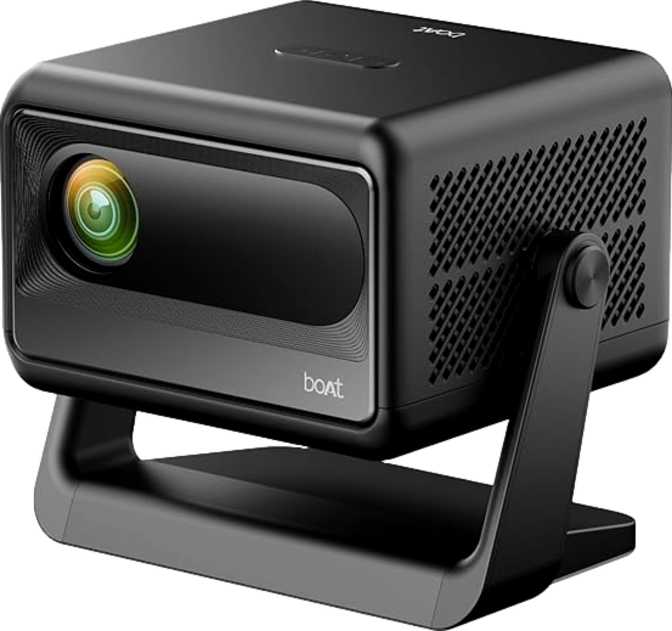
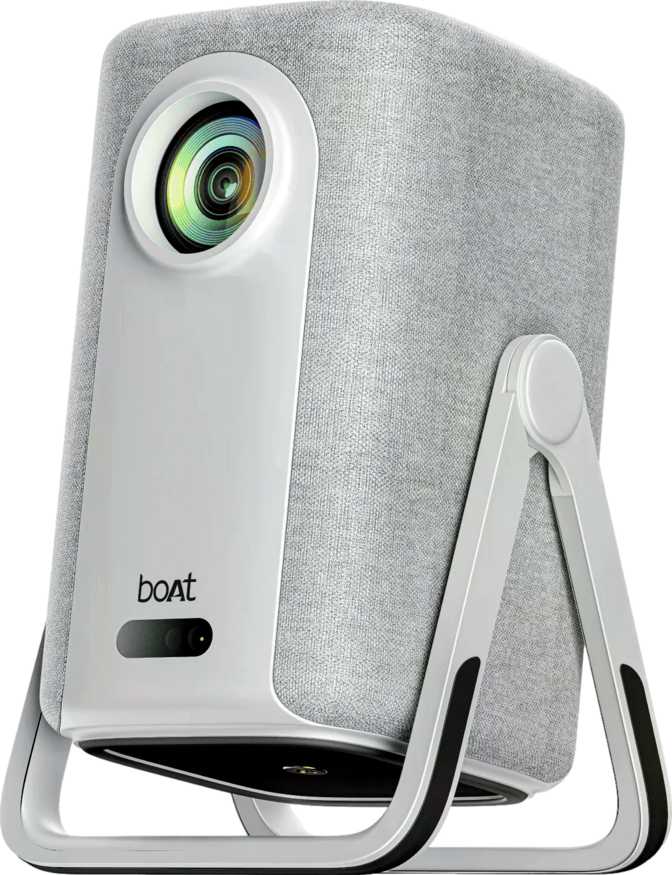
The CineHead M1 is genuinely compact. At roughly the footprint of a hardback novel — 194mm tall, 117mm wide, and 135mm deep — it sits on a shelf without dominating the room. At 1.2 kilograms, it occupies a comfortable middle ground between ultra-portable pocket projectors and full desktop units.
The form factor is designed for room-to-room mobility rather than daily outdoor carry. Think bedroom-to-living-room convenience, or taking it to a friend's place for a movie night — not hiking to a campsite with it in a daypack.
Physical Build
boAt has kept the design understated. The plastic construction is functional rather than luxurious, but the unit feels solid enough for regular indoor use. There are no sharp edges or flimsy panels, and port placement feels considered rather than an afterthought.
The absence of any lens shift mechanism — neither vertical nor horizontal optical adjustment is available — means physical placement is critical. The projector must be aligned carefully with the projection surface, as there is no optical correction for off-centre positioning. This is a common constraint at this price tier and worth planning around before purchase.
Dimensions at a Glance
Projection Performance: What 1080p at 200 Lumens Really Means
Critical Buyer Warning: Brightness Is the Defining Constraint
200 ANSI lumens is on the lower end of the usable spectrum for home projectors. In a fully darkened room, the CineHead M1 produces a satisfying image at sizes between 80 and 120 inches. With curtains drawn but daylight present, quality drops significantly. In a normally lit room, the image becomes difficult to use. This is strictly a dark-room device — and buyers who understand that going in will be far happier than those who don't.
Resolution and 4K Compatibility
The CineHead M1 outputs a native Full HD image — 1,920 by 1,080 pixels — matching the resolution of the vast majority of streaming content on Netflix, Amazon Prime, and Disney+. It will not upscale or downscale standard HD content, meaning text is legible, facial detail reads cleanly, and pixelation is not an issue at projection sizes up to around 100 inches.
What it cannot do is pass through 4K content in its native resolution. UHD sources display at 1080p — still watchable, but not the full ultra-high-definition experience some buyers might expect.
HDR Support and Color Depth
The CineHead M1 does not support HDR10, HDR10+, or Dolby Vision. HDR-encoded content is tone-mapped to standard dynamic range, meaning the expanded contrast and highlight detail HDR is designed to deliver will not be available.
For most casual viewers watching standard streaming content, this difference is barely perceptible in a dark room. For buyers specifically seeking HDR performance or the peak-brightness pop of high-contrast imagery, this projector is not the right match. 3D playback is also absent — a common omission at this price tier and not a practical loss for most users.
Throw Distance and Achievable Screen Sizes
The projector requires at least 1.2 meters of space between the lens and the wall or screen to produce a usable image. At 1.5 to 2 meters, expect a comfortable 80- to 100-inch picture. Reaching the 150-inch maximum requires roughly 3 to 3.5 meters of throw distance.
For standard-sized bedrooms or studio apartments, hitting 100 inches at a moderate throw is very achievable. The 150-inch claim requires either a large room or a deliberate layout — and at that size, brightness becomes a constraint even with lights completely off.
Connectivity: Where the CineHead M1 Earns Its Keep
This is where the boAt CineHead M1 genuinely differentiates itself from comparable LED projectors in its weight class. The wireless connectivity suite is impressive for a compact device at this price point.
Wireless Casting — Four Protocols, One Device
Cast directly from any Android phone, tablet, or Chrome browser on any laptop — no external dongle needed.
iPhone and Mac users cast or mirror natively — the same protocol used by Apple TV, with no extra hardware.
Screen mirroring for Windows laptops and Miracast-enabled Android devices — no app required on the source device.
Underpins all wireless casting and connects the built-in smart TV platform directly to streaming services.
Worth knowing: Having both Chromecast and AirPlay in a single device at this price is uncommon. A household with mixed Android and iOS users can both cast natively without workarounds or adapters.
Wired and Physical Connections
-
1x HDMI Port — handles game consoles, streaming sticks, laptops, and set-top boxes.
-
1x USB Port — media playback from a thumb drive, or power for an attached streaming stick.
-
3.5mm Audio Jack — wired connection to external speakers or headphones when the built-in audio falls short.
-
No Ethernet Port — Wi-Fi is the only internet option; wired network connectivity is unavailable.
-
No Optical Audio Out — no S/PDIF output for home theater receivers that require it.
-
No External Memory Slot — media must be accessed via USB drive or wirelessly; no SD card support.
Built-In Smart TV and Voice Commands
The CineHead M1 includes a built-in smart TV platform, meaning it can access streaming applications directly without requiring a separate device like a Chromecast dongle, Amazon Fire Stick, or Roku. Combined with the dedicated smartphone app, this turns the projector into a standalone entertainment hub — no additional hardware required out of the box.
This is a genuine convenience advantage over simpler LED projectors that function purely as display devices and require an external source for all content.
Voice command support adds hands-free control for navigation and content search. The dedicated smartphone app extends control options beyond the physical remote — particularly useful when the remote is misplaced or you are operating the projector from across a dark room.
Bluetooth connectivity allows pairing with external wireless speakers or headphones — a feature that becomes especially important when the projector is used in a larger room where the built-in audio cannot fill the space.
Audio Performance: Stereo Sound, Real Limits
The CineHead M1 carries two built-in speakers in a stereo configuration — an advantage over the mono drivers found on many compact projectors at this level. Stereo separation means there is at least a sense of spatial audio when watching films, and voices are presented clearly in a quiet environment.
However, each driver outputs only 3 watts — 6 watts total. At projection sizes of 80 to 100 inches, the audio can feel undersized relative to the visual scale. The cinematic weight and low-frequency presence that a good movie soundtrack demands will largely be absent. In a quiet bedroom at low to moderate volume, the built-in speakers are adequate. For social viewing, a larger room, or any film where the soundtrack matters, an external speaker is strongly recommended.
There is no Dolby Atmos support — this aligns with the hardware capability of the drivers and is expected at this price point. Buyers can route audio out via the 3.5mm jack or connect wirelessly via Bluetooth to immediately elevate the listening experience.
Lamp Life and Long-Term Ownership Value
The LED light source is rated at 30,000 hours in eco mode — one of the strongest long-term ownership arguments for LED-based projectors over traditional lamp designs. At three hours of use per day, that rating translates to over 27 years of theoretical lamp life. In practice, brightness gradually diminishes over time, but there is no lamp replacement cost or risk of sudden lamp failure to plan for.
Traditional projector lamps typically need replacement every 2,000 to 5,000 hours at a cost that can rival the projector itself. The CineHead M1's LED source removes that ongoing expense entirely, making the long-term cost of ownership considerably lower than the headline price might suggest.
The unit carries a one-year warranty — standard for this category, though not exceptional. Given the lamp life rating, the components most likely to require attention over time are the electronics and optics rather than the light source itself.
Real-World Usage Scenarios: Who Should Buy This?
This Projector Is Right For
-
Dark-Room Home CinemaBedroom or small living room viewers who watch films at night with lights off and want a screen larger than any TV available at this price.
-
Students and RentersDorm rooms or rented accommodation where portability and smart TV functionality matter — and nothing permanent can be installed.
-
Casual Family Movie NightsWeekend films with children in a controlled indoor setting where content is primarily streaming-based.
-
Mixed iPhone/Android HouseholdsAirPlay and Chromecast together eliminate the "whose phone can cast?" problem entirely — both ecosystems work natively.
-
Buyers Avoiding Extra DonglesThe built-in smart TV platform means no additional hardware is needed to access apps and streaming libraries.
This Projector Is Not Right For
-
Bright Room or Daytime Use200 lumens washes out in any ambient light. This is a non-negotiable constraint that shapes the product's entire use case.
-
Motion-Sensitive GamingNo input lag specification is provided. Buyers who prioritise gaming responsiveness should investigate this independently before purchasing.
-
4K or HDR EnthusiastsUHD and HDR content will display at 1080p in standard dynamic range. The experience is functional, not premium.
-
Large-Room or Outdoor EventsBeyond 100 inches in real-world lighting, brightness becomes a serious limiting factor regardless of setup.
-
Users Needing Wired InternetNo Ethernet port means Wi-Fi is the sole internet option. Complex setups requiring stable wired connectivity will hit a hard wall.
How the boAt CineHead M1 Compares
The CineHead M1's wireless connectivity stack is its clearest competitive advantage. Most budget projectors force a compromise — AirPlay or Chromecast, not both. The 1080p resolution is competitive, though brightness sits at the lower boundary of what is practically useful. Against mid-range competitors, the CineHead M1 loses on brightness, HDR support, and audio power — but typically wins significantly on price.
| Feature | boAt CineHead M1 | Typical Budget Competitor | Mid-Range Smart Projector |
|---|---|---|---|
| Native Resolution | 1080p Full HD | 720p – 1080p | 1080p – 4K |
| Brightness | 200 ANSI lumens | 150 – 300 lumens | 400 – 800 lumens |
| Wireless Casting | AirPlay + Chromecast + Miracast | Usually one or two protocols | AirPlay + Chromecast common |
| Built-In Smart TV | Sometimes | ||
| HDR Support | None | None | HDR10 common |
| LED Lamp Life | 30,000h (eco) | 20,000 – 30,000h | 20,000 – 30,000h |
| Physical Size | Compact (1.2kg) | Compact | Medium to large |
| Built-In Audio | 2×3W Stereo | 2 – 5W mono or stereo | 5 – 10W stereo |
Honest Strengths and Weaknesses
Where It Stands Out
The boAt CineHead M1 makes smart choices in the areas it competes hardest. The wireless connectivity suite — simultaneously supporting Chromecast, AirPlay, and Miracast — is genuinely impressive for a compact projector and removes almost all friction from casting content across different devices and ecosystems. Most sub-budget projectors force a compromise between Apple and Android compatibility; this one does not.
The built-in smart TV platform eliminates the need for a supplementary streaming device, and the LED light source's longevity removes the ongoing replacement cost and failure anxiety that traditional projector lamps bring. For buyers using this primarily after dark in a controlled space, the 1080p image is clean and detailed at sensible viewing distances.
The stereo speaker configuration — even with modest power output — is preferable to the mono output that competitors at this price often provide. And at 1.2 kilograms, it is light enough to genuinely move between rooms without strain.
Where It Falls Short
The weaknesses are real and matter. At 200 ANSI lumens, the projector is confined to low-light environments — this is not a caveat to gloss over, it is the central limitation that will determine whether this product suits a given buyer's life. It is among the dimmer entries in an already modest brightness category.
The absence of any HDR support limits the depth and drama of modern streaming content. The built-in audio, while stereo, lacks the physical presence to fill even a medium-sized room convincingly. Buyers should budget for an external Bluetooth speaker to get the full value of the visual experience. The single HDMI port and lack of Ethernet mean that more complex setups will encounter hard limits quickly.
The one-year warranty is standard but not generous for a device meant to serve as a primary entertainment tool. And the absence of lens shift means placement requires careful planning — there is no optical shortcut for correcting a misaligned setup.
Questions Buyers Ask Before Purchasing
Final Verdict
The boAt CineHead M1 is a focused product that does specific things well and makes deliberate compromises to hit its target. The wireless connectivity suite — simultaneously supporting Chromecast, AirPlay, and Miracast — is genuinely impressive for a compact projector and removes almost all friction from casting regardless of device ecosystem. The built-in smart TV eliminates the need for supplementary hardware, and the LED light source's longevity removes the ongoing cost and anxiety that traditional projector lamps create.
For casual home viewers, students, and portable movie-night enthusiasts who plan to use this in a dark room — this projector delivers a practical, well-connected experience that exceeds what its size and category might suggest.
It is not a projector for bright rooms, HDR enthusiasts, serious gamers, or anyone who needs professional-grade brightness. Go in with accurate expectations about the 200-lumen brightness ceiling, budget for an external Bluetooth speaker, and the boAt CineHead M1 will serve its intended audience very well indeed.