Bmax B11 Power Review: A Palm-Sized Desktop With Surprising Depth
Mini PCsThere is a persistent assumption that capable desktop computing requires mass: a tower, a power brick, a dedicated corner of the room, and the sound of fans spinning somewhere near your feet. The Bmax B11 Power challenges that assumption directly. It packages a 14-core hybrid processor, a full Intel Arc GPU, 24 gigabytes of fast DDR5 memory, a terabyte of NVMe storage, and support for four simultaneous displays into a chassis you can pick up with one hand.
What separates the B11 Power from the flood of budget compact machines is where Bmax chose to invest. The processor is not a stripped-down power-saving chip designed for web browsing appliances. The graphics are not a minimal display driver wearing a modern label. The memory configuration is not the 8GB DDR4 floor that cheap mini PCs use to pad their spec sheets. Whether those investments justify the trade-offs depends on your workload — and this review is here to tell you which side of that line you are on.
Size and Build: Why the Form Factor Is Actually the Feature
At 126 mm wide, 112 mm deep, and 52 mm tall, the B11 Power is roughly the size of a thick hardcover book. Its interior volume sits under 740 cubic centimeters — a mid-tower desktop case holds approximately ten times as much air. You can place this machine beside your keyboard, tuck it behind a monitor, or store it in a drawer. There is no cable-managed tower, no fan noise from a case inches from your shins, and no dedicated machine corner required.
This matters practically, not just aesthetically. For apartment dwellers, students working from small rooms, professionals with crowded desks, or anyone who has been tolerating a full-size tower out of inertia rather than actual need, the compact form factor is a functional upgrade. The machine that used to dominate your workspace becomes an object you barely notice is there.
The Processor: Hybrid Architecture, Real-World Performance
Fourteen Cores, Twenty-Two Threads, and the Work They Share
The processor inside the B11 Power uses Intel's hybrid core architecture: six performance-optimized cores for demanding tasks, paired with eight efficiency-tuned cores for lighter background work, running a total of 22 processing threads. The platform routes workloads intelligently between clusters without requiring user configuration. You do not set anything up; the processor sorts tasks automatically.
This arrangement reflects how most people actually use computers. A video call running in the background while you edit a document. A compiler running while Slack, a music app, and a browser with twenty-plus tabs stay live. The 22-thread configuration handles this parallel reality without the resource contention that forces cheaper mini PCs into visible slowdowns during multitasking.
Burst Speed and Daily Responsiveness
The processor runs at conservative clock speeds during idle and light use, preserving power and minimizing heat generation. When a demanding task arrives, it accelerates to 4.8 GHz on its performance cores — and that acceleration is immediate, not gradual. Application launches, spreadsheet calculations, file indexing, video export previews, and code compilation all benefit from this burst headroom.
Efficiency by Design: The 28-Watt Architecture
This processor operates within a 28-watt thermal envelope — a laptop-class power budget that prioritizes thermal efficiency over raw frequency. Modern laptop-class silicon at this power level has closed most of the performance gap with equivalent desktop chips from several years prior, while generating less heat and drawing a fraction of the electricity over a full day of use.
The B11 Power can sustain its performance levels through extended sessions without throttling, and the cooling system does not need to operate aggressively. The processor tolerates up to 110°C internally, giving the thermal management system meaningful runway before it ever needs to dial back performance.
Cache Depth: The Spec You Do Not See in Headlines
The processor carries 24 megabytes of L3 cache, which acts as a high-speed staging area between the processing cores and system memory. The more cache available, the less frequently the CPU waits for data to travel from slower channels. In practical terms, this smooths context-switching between applications, reduces micro-hesitation during heavy multitasking, and keeps response times consistent when many processes compete for resources — the difference between a machine that stays snappy throughout a demanding session and one that begins to stutter once enough apps are open.
Graphics: Intel Arc Xe Is Not What You Remember Integrated Graphics Being
1,024 Shader Cores and a 2,250 MHz Boost Clock
The B11 Power uses Intel Arc Xe-LPG graphics with 128 execution units — and the distinction from Intel's previous-generation basic integrated graphics matters significantly. With 1,024 shader units, 64 texture mapping units, 32 render output units, and a boost clock of 2,250 MHz — roughly seven times its base idle speed — this GPU carries real throughput capacity. This shader count and clock range sits in approximately the same performance tier as entry-level discrete graphics cards from a previous product generation: a concrete difference from the bare-minimum display drivers that the term "integrated graphics" historically implied.
Gaming: Casual Yes, Dedicated No
Competitive multiplayer titles, esports games, and older AAA releases run at 1080p with reasonable frame rates and medium-to-high settings on the Arc GPU. The B11 Power can support a casual gaming habit without needing a separate machine. What it cannot deliver is a consistent high-frame-rate experience in current graphically-demanding titles, 4K gaming, or anything requiring dedicated VRAM allocation. If gaming is an occasional weekend activity alongside daily productivity use, the Arc GPU handles it without embarrassment.
DirectX 12 Ultimate and API Coverage
DirectX 12 Ultimate support means this GPU has access to ray tracing and mesh shading in software that uses them. Performance under those conditions will be modest, but the API compatibility matters for long-term software relevance — it prevents the artificial incompatibility that will eventually lock older machines out of applications and games built on modern rendering interfaces. OpenCL 3.0 extends usefulness into GPU-accelerated workflows: image processing pipelines, locally-run AI inference tools, and creative applications. The 7 nm fabrication process underlying the chip contributes to the efficiency that allows these capabilities to coexist within a 28-watt thermal package.
Four Displays — And It Is Not a Marketing Trick
Supporting up to four simultaneous displays is an unusual capability at this form factor and price tier, and the B11 Power implements it with real physical outputs: two HDMI ports, one DisplayPort, and a USB-C port that carries a video signal alongside data. Both HDMI outputs run the HDMI 2.1 standard, meaning they are capable of driving 4K content at high refresh rates — not just nominal port counts that max out at 30 Hz.
| Output | Standard | Count | Capability |
|---|---|---|---|
| HDMI | 2.1 | 2 | 4K at high refresh rates |
| DisplayPort | Current | 1 | High-resolution display support |
| USB-C | 10 Gbps | 1 | Shared display + data |
| Maximum simultaneous displays: 4 | |||
Memory and Storage: Configured Ahead of the Category Standard
24 GB DDR5 Provides Room That Most Users Never Fill
A browser session with thirty-plus tabs, three productivity applications, a video call, and a background music stream together rarely push beyond 12–14 gigabytes of active memory consumption under normal conditions. Starting from 24 GB means the B11 Power is insulated from the memory pressure that causes cheaper mini PCs to slow progressively as software grows heavier. The operating system can cache aggressively. Applications stay resident rather than being evicted and reloaded. Multitasking stays fluid through a full workday.
The DDR5 memory standard provides meaningfully higher bandwidth than DDR4 — still found in many competing mini PCs. For integrated graphics, this matters directly: the GPU and CPU share the same physical memory pool, and faster data transfer rates translate into more usable graphics throughput. Running in a dual-channel configuration effectively doubles available memory bandwidth compared to single-channel setups — an engineering decision that not all budget mini PC manufacturers get right.
Base configuration: 24 GB DDR5
Maximum ceiling: 96 GB
Professional-grade memory configurations are within reach for users whose workloads eventually demand them.
ECC memory is irrelevant for consumer and prosumer applications but relevant for anyone with enterprise reliability requirements. Plan accordingly if you operate in that environment.
1 TB NVMe: Fast Storage at a Practical Capacity
One terabyte of NVMe-based solid-state storage is the right base configuration for a primary machine. Operating system and core applications occupy roughly 60–80 gigabytes; the remaining capacity supports a working project library, media collection, application installs, and a local backup archive before external storage becomes necessary. The NVMe interface means application launches, file operations, and system startup are measured in seconds rather than tens of seconds — a quality-of-life factor that affects every interaction with the machine, every day.
This is a material improvement over mini PCs that ship with slower SATA-based SSDs or embedded eMMC flash storage. The difference in daily responsiveness is immediately perceptible.
Connectivity: What Is Here, What Is Fast, and What Is Missing
USB Port Breakdown
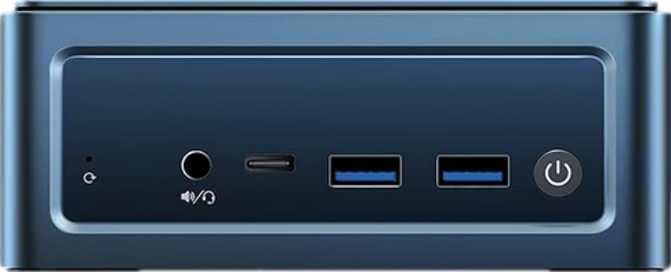
The B11 Power provides six USB ports across three speed tiers. Two USB-A ports operate at 10 Gbps — the faster modern standard, suitable for external SSDs, high-speed capture cards, and fast flash drives. The single USB-C port also runs at 10 Gbps and handles both data and display output simultaneously. The two remaining USB-A ports run at legacy USB 2.0 speeds — adequate for keyboards, mice, and passive hubs, but unsuitable for any peripheral that requires throughput.
| Port | Type | Count | Speed | Best For |
|---|---|---|---|---|
| USB-A | 3.2 Gen 2 | 2 | 10 Gbps | External SSDs, capture cards |
| USB-C | 3.2 Gen 2 | 1 | 10 Gbps + Display | Docks, displays, fast peripherals |
| USB-A | 2.0 | 2 | 480 Mbps | Keyboards, mice, passive hubs |
| USB4 / Thunderbolt | — | 0 | — | Not supported |
Wireless: Wi-Fi 6 and Bluetooth 5.2
Wi-Fi 6 (802.11ax) improves on the previous Wi-Fi 5 standard not just in peak theoretical throughput, but in how it behaves in congested environments. In shared apartments, offices with many competing devices, or homes with a growing number of wireless products, Wi-Fi 6 maintains more consistent performance and handles simultaneous connections more gracefully. For a desktop machine used throughout the workday, that consistency matters more than peak speed numbers.
The dedicated Ethernet port provides a direct wired connection — always a sensible default for a stationary desktop machine. Bluetooth 5.2 supports modern wireless peripherals and audio devices with reduced latency relative to older Bluetooth generations.
Audio and Remaining I/O
- 3.5 mm audio jack — standard desktop speaker and headphone coverage
- No S/PDIF digital audio output — home theater PC builders relying on optical/coaxial receivers should note this
- No VGA output — expected on modern hardware but worth confirming if your monitor is older
- 1 × RJ45 Ethernet — wired networking with no adapters required
Performance in Context: Reading the Benchmarks Honestly
The B11 Power achieves a multi-threaded CPU benchmark score approaching 25,000 points in industry-standard testing. To place that number: entry-level and budget compact machines running low-power N-series processors typically land between 8,000 and 15,000 points. The B11 Power is clearly in a higher tier, approaching territory previously occupied by mainstream desktop chips from earlier product generations.
Real-World Usage: Who This Machine Is Built For
- Work-from-home professionals managing video conferencing, office productivity suites, and cloud-based tools — the performance tier is comfortable and the compact footprint is a desk-management upgrade.
- Students and academics handling research workflows, document-heavy environments, online coursework, and occasional multimedia projects — 24 GB handles aggressive browser tab usage without the slowdowns that undermine cheaper configurations.
- Multi-monitor productivity users — traders, developers, content monitors — the quad-display support is practical and rare at this price tier.
- Home theater and media users setting up a living room PC, local media server, or digital art display — dual HDMI 2.1 outputs, quiet operation, and a compact profile that fits on an AV shelf.
- Developers and programmers working with web development environments, build systems, containerized applications, or local database tooling — the 14-core processor and 24 GB DDR5 is a credible daily driver.
- A dedicated gamer wanting current AAA titles at high settings — you will reach the limits of integrated graphics quickly. A compact desktop with a discrete GPU is the right investment.
- A video editor or motion designer working with high-resolution footage, color grading, or complex effects timelines — professional turnaround speeds require discrete GPU acceleration the B11 Power cannot provide.
- A machine learning hobbyist running local model inference or training — integrated graphics share memory with the system CPU rather than maintaining an isolated VRAM pool. A dedicated CUDA-capable GPU is the appropriate tool.
- Enterprise or uptime-critical buyers — the one-year warranty and absence of ECC memory are non-issues for consumer use, but they matter in environments where memory reliability and extended manufacturer support carry real operational consequences.
How It Compares Against the Competition
The compact desktop market divides into recognizable performance and price tiers. The B11 Power sits in the upper-middle range — above budget-class machines but below dedicated enthusiast-compact systems with discrete GPU options.
| Feature | Bmax B11 Power | Budget Compact PCs | Premium Compact Desktops |
|---|---|---|---|
| Core / Thread Count | 14 cores, 22 threads | 4–8 cores typical | 14–24 cores |
| CPU Power Budget | 28 W laptop-class | 6–15 W (N-series) | 45 W+ |
| Integrated GPU | Arc Xe-LPG 128EU | Intel UHD (basic) | Arc or AMD Radeon |
| Discrete GPU Option | No | No | Sometimes available |
| RAM (Configured) | 24 GB DDR5 Dual-Ch. | 8–16 GB DDR4/DDR5 | 16–32 GB DDR5 |
| Max RAM Ceiling | 96 GB | 32–64 GB | 64–128 GB |
| Storage | 1 TB NVMe | 256–512 GB (SATA/NVMe) | 512 GB–2 TB NVMe |
| Display Outputs | 4 (2× HDMI 2.1 + DP + USB-C) | 2 | 2–3 |
| Wi-Fi Standard | Wi-Fi 6 (802.11ax) | Wi-Fi 5 or Wi-Fi 6 | Wi-Fi 6 or Wi-Fi 6E |
| USB4 / Thunderbolt | No | No | Occasionally included |
Honest Strengths and Limitations
The B11 Power earns its place in the mid-range mini PC conversation on the strength of a few well-executed decisions. Equipping the system with DDR5 memory in dual-channel configuration, rather than the single-channel DDR4 that budget machines use to hit a lower price point, is a material choice — it lifts graphics performance and reduces memory latency in ways that are perceptible during everyday use. Pairing that memory with Intel Arc Xe-LPG graphics rather than a minimal display driver means the machine handles media, casual gaming, and GPU-accelerated tasks at a meaningfully higher level than its cheaper competitors.
Four-display support through real HDMI 2.1 outputs — capable of driving 4K content at high refresh rates — stands out as a concrete differentiator for multi-monitor use cases. This is a hardware capability most machines in this class simply do not offer at comparable price points. The processor's hybrid architecture handles the parallel reality of modern computing effectively, and the 24 MB of L3 cache provides depth that prevents the micro-lag common in budget configurations during heavy multitasking.
Where the B11 Power asks for tolerance: the two legacy-speed USB ports contribute little meaningful expansion value and exist primarily to pad the total port count. More significantly, the absence of USB4 or Thunderbolt is a real gap for users who have invested in high-bandwidth docks or premium peripheral ecosystems — a platform-level constraint, not an oversight, but a ceiling worth knowing about before purchasing.
The one-year warranty period is shorter than what several competitors offer in this segment. The locked processor design means no performance headroom exists through overclocking, and no upgrade path exists for the chip itself — standard across virtually all mini PCs, but it reinforces the B11 Power's identity as a long-term fixed-configuration purchase.
Answers to Questions Real Buyers Search For
Bmax B11 Power: Our Recommendation
The Bmax B11 Power is a well-considered compact desktop that addresses the actual gap between budget mini PCs — which compromise too much on performance — and premium compact systems that charge significantly more for capabilities most users do not need.
The combination of a 14-core hybrid processor, 24 GB of DDR5 memory in dual-channel, 1 TB of NVMe storage, and Intel Arc Xe-LPG integrated graphics assembles a machine that handles demanding productivity workloads, development environments, multi-monitor setups, and casual gaming from a chassis that takes up less desk space than a ream of printer paper.
The four-display capability — delivered through real HDMI 2.1 outputs — is the most distinctive feature in the specification sheet and directly adds value for anyone managing an extended workspace. The memory configuration provides longevity that cheaper base configurations cannot match as software continues to grow more demanding over time.
- You need a quiet, compact, capable daily driver
- Multi-monitor productivity is a priority
- Developer or office workloads dominate your day
- You want DDR5 performance without a full-size tower
- Serious gaming is a significant use case
- You rely on Thunderbolt or USB4 peripherals
- Professional video or 3D rendering is your workload
- Enterprise warranty and ECC support are required