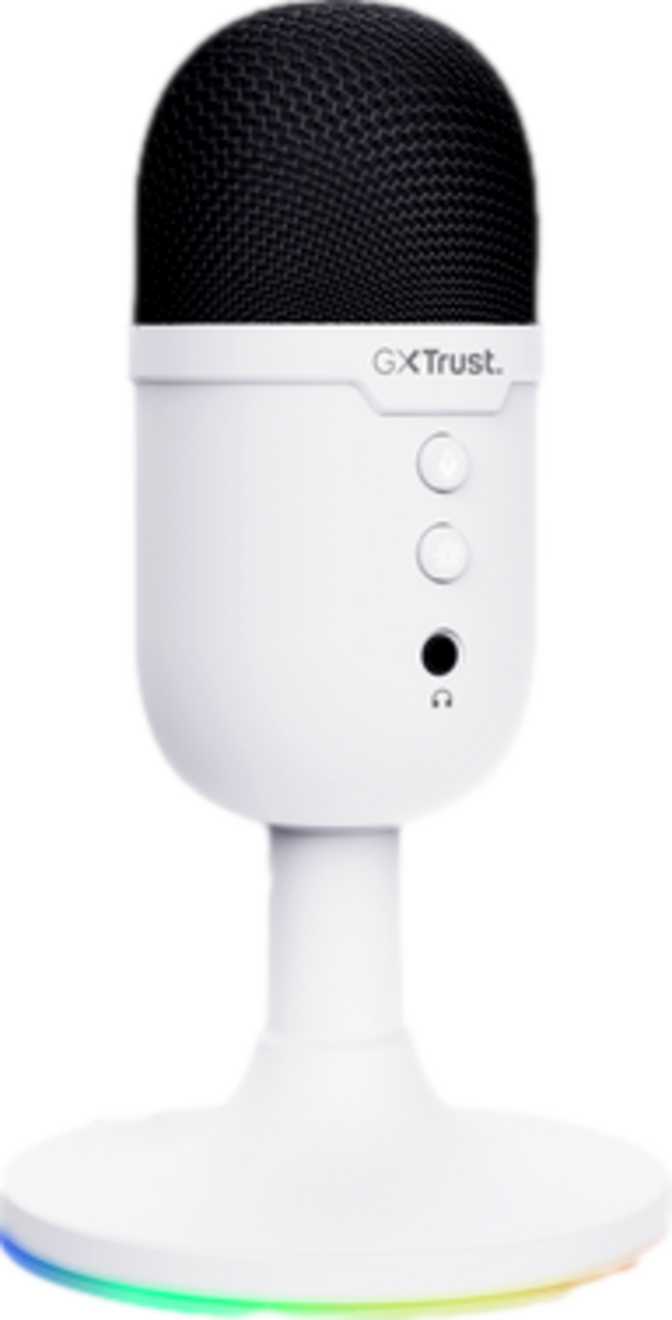
Most USB microphones sold to gamers and streamers are stripped-down products at a stripped-down price. You buy the capsule, then you buy a shock mount, then you buy a pop filter, then you learn the hard way that half the available options do not work on Mac. The Trust GXT 234 Yunix takes a different approach: arrive as a complete package, work immediately on any major desktop operating system, and leave no obvious gap between unboxing and first use. Whether that philosophy serves you depends on what you need — and on how honestly you have assessed your own audio production ambitions.
At a Glance
Eight things to know about the Trust GXT 234 Yunix before reading on.
Plug-and-Play USB
No drivers or software required
Shock Mount Included
Desk vibration isolation built in
Pop Filter Included
Plosive protection from day one
Hardware Mute Button
On-device, no software needed
Headphone Monitoring
Real-time zero-latency output
Windows & Mac Ready
Confirmed compatible, plug and go
RGB Lighting
Gaming-aesthetic illumination built in
Cardioid Pickup Pattern
Focused directional voice capture
Design, Build, and the Physical Experience
The Yunix is compact. It stands just under the height of a standard coffee mug with a nearly square cross-section on each side, and at just over two hundred grams it is genuinely lightweight. The shock mount holds it without any sense of imbalance, and moving it around on a desk takes no effort.
The chassis feels solid without being exceptional. It is built to handle the realities of a gaming desk — regular repositioning, the occasional bump, perhaps a move between setups — but it does not have the dense, premium feel of a microphone designed as a long-term professional tool. For daily home use, the build quality is perfectly appropriate.
The RGB Factor
RGB illumination is built into the microphone body. It is aimed squarely at the gaming market, and in a setup where your keyboard, mouse, and headset are already lit, the Yunix integrates naturally. In a home office context or any scenario where glowing peripherals feel out of place, it will stand out in the wrong direction. There is no audio performance implication in either case — the lighting is entirely cosmetic.
What Comes in the Box
The most consequential aspect of the Yunix's physical package is what arrives with it. Shock mounts and pop filters are not standard inclusions at the budget USB microphone tier — they are accessories that most buyers discover they need after the initial purchase, then buy separately. Their presence here means the Yunix is ready to use immediately at a quality level above what the base price alone would typically suggest.
Shock Mount
Suspends the capsule and blocks desk vibrations from entering your recording. Typing, setting down objects, and surface noise are all significantly reduced.
Pop Filter
Disperses the sharp air bursts produced by P and B sounds before they reach the capsule, eliminating the blasts that distract listeners.
On-Device Control Panel
Physical controls mounted on the microphone body, including a dedicated mute button reachable with one hand without looking away from the screen.
USB Cable
Generous length reaches a rear desktop port or front panel without requiring an extension in typical desk configurations.
Audio Performance: What You Actually Hear
Voice Frequency Range in Human Terms
The Yunix captures the frequency range that matters most for intelligible, natural-sounding speech. The low end cuts off before the deep sub-bass territory — the rumble from air conditioning, street traffic, or room resonance that you would rather not capture anyway. The high end stops short of the very top of the audible spectrum, which means the ultra-fine frequencies that give acoustic instruments and high-resolution voice recordings their shimmer are not fully represented.
In practical terms for gaming and streaming: voices come through clear, present, and easily understood. For a podcaster comparing this recording against a broadcast-studio microphone, the depth at the low end and the openness at the high end will be noticeably narrower. For Discord, Twitch, YouTube, and video calls, this range is entirely sufficient.
Digital Quality for Video Content
The Yunix captures audio at the sample rate used as the professional standard in broadcast television and video production — the same technical tier your video footage is recorded at. For anyone creating video content, your audio and video will natively share the same technical foundation, eliminating the resampling step that can introduce subtle artifacts when mismatched audio and video are merged in editing.
Matched for streaming and video production
For streamers and video creators, this quality exceeds what distribution platforms actually deliver to viewers — the microphone is not the bottleneck in your production chain.
The Noise Floor: Setting Realistic Expectations
The signal-to-noise ratio — how much genuine audio the microphone captures versus the internal electronic hiss it introduces — sits at the lower boundary of what is considered acceptable for voice recording. In a very quiet room, with no one speaking, a careful listener may detect a faint, low-level background hiss. During active speech, the voice masks this completely and it becomes irrelevant.
For gaming, streaming, or video calls — where the listener hears you alongside game audio, ambient room sound, and platform-level compression — this noise floor will never be noticed or complained about. For premium audio content production where fidelity is part of the brand, this characteristic represents a genuine technical ceiling.
Know the noise floor trade-off
Audiobook narrators, professional voice actors, and premium podcast producers may find the noise floor requires noise reduction processing in post-production. For gaming and streaming, this is a non-issue.
Handling Louder Input
The microphone can absorb emphatic, raised-voice input without distorting or clipping. A streamer reacting intensely to a gaming moment, a presenter projecting their voice, someone leaning in to speak forcefully — none of these push this microphone to its limits. What falls outside its optimal range is capturing loud acoustic sources in close proximity, such as musical instruments or speaker cabinets.
Pickup Pattern: What This Microphone Listens To
The Yunix uses a cardioid polar pattern — one fixed pattern, not switchable. For the solo-speaker scenarios this microphone is built for, this is the correct choice.
Cardioid describes a directional pickup zone concentrated in front of the capsule, progressively less sensitive at the sides, and largely deaf to sounds approaching from behind. Think of it as a wide cone of sensitivity pointed at whoever is speaking, with diminishing pickup as you rotate away from that centre line.
Cardioid: The Solo-Speaker Pattern
- Picks up sound directly in front of the capsule
- Partially rejects keyboard and peripheral noise from the sides
- Suppresses room reverb bouncing off the wall behind you
- Cannot be reconfigured for multi-speaker or interview scenarios
The Yunix is a single-speaker tool that makes no provision for anything else. For solo streamers, solo gamers, and solo remote workers, this is never a constraint. For anyone envisioning interviews, panels, or multi-participant recording, it is.
Headphone Monitoring: Useful, With One Caveat
The 3.5mm headphone socket on the Yunix allows you to plug headphones directly into the microphone and hear your own voice in real time as you speak. This zero-latency monitoring lets you check your positioning, gauge your volume, and confirm your background noise situation without waiting for software to process and return the audio.
There is one technical specification buyers should understand before relying on this output. The headphone output is rated for high-impedance headphones — the type favoured by studio engineers and audiophile listeners. Standard consumer headphones, earbuds, and gaming headsets are built with low-impedance drivers and may experience lower-than-expected volume through this jack as a result.
Gaming headset users: check the monitoring volume first
The monitoring feature is functional, but users with typical low-impedance gaming headsets may find the output volume softer than expected. Test it with your specific headphones before depending on it as a primary monitoring solution.
There is no large-format (6.35mm) headphone socket, so professional headphones that use the larger connector will need an adapter.
Compatibility and Setup Experience
The Yunix is a USB microphone with confirmed compatibility with Windows and Mac. It has no compatibility with Android or iOS — this is a desktop device by deliberate design, not an oversight.
Connecting it is entirely plug-and-play. No drivers, no companion software, no account creation. The moment you plug it into a USB port, the computer recognises it as a standard audio input. In OBS, Streamlabs, Discord, Zoom, Audacity, or any other application that allows audio input selection, the Yunix appears as a selectable device.
Windows
Confirmed compatible
Mac OS X
Confirmed compatible
Android
Not compatible
iOS
Not compatible
Power comes entirely from the USB connection. There is no battery to charge, no external power supply required. As long as a computer is connected, the microphone is operational.
Who the Trust GXT 234 Yunix Is For — and Who It Isn't
Getting the most from this microphone starts with knowing whether your use case is the right fit.
- A PC gamer wanting clear team comms without the muffled sound of a headset boom microphone
- A solo streamer producing gaming or entertainment content on Twitch, YouTube, or similar platforms
- A remote worker who wants a physical mute button and noticeably better call audio than a laptop mic
- A first-time dedicated microphone buyer who wants a complete, ready-to-use setup with no add-on shopping
- Anyone building a gaming desk where RGB-lit peripherals are part of the visual experience
- A podcast producer who markets audio quality as a content differentiator, where noise floor will become a liability
- A musician, vocalist, or instrumentalist who needs wider frequency capture for music recording
- A mobile content creator who needs a microphone that connects to a smartphone or tablet
- An interviewer or multi-guest host where a single cardioid mic cannot serve all participants
- A professional voice actor or audiobook narrator where noise reduction in post-production would become routine
How It Stacks Up Against the Category
The budget USB microphone market is dense. Here is where the Yunix gains ground and where it concedes it.
| Consideration | Trust GXT 234 Yunix | Typical Bare-Bones Competitor |
|---|---|---|
| Shock mount included | Yes | Rarely |
| Pop filter included | Yes | Rarely |
| On-device mute button | Yes | Varies |
| Windows and Mac compatible | Both confirmed | Not always both |
| Zero-latency headphone output | Yes | Not always included |
| Driver-free plug-and-play | Yes | Varies |
| Polar pattern flexibility | Cardioid only | Sometimes multiple |
| Noise floor performance | Lower end of acceptable | Sometimes better on spec |
| Mobile device compatibility | No | Varies |
The honest competitive picture: if pristine audio specifications are the priority, alternatives exist that achieve a slightly cleaner noise floor. Those alternatives typically arrive without accessories, without RGB, or with more complex setup requirements. The Yunix makes a conscious bet that out-of-box completeness matters more to its target buyer than the last margin of audio specification performance. For most of that target audience, that bet is correct.
What Works and What Does Not: An Honest Assessment
The Yunix earns its strongest marks for making the microphone ownership experience simple. Plug it in, set it on the shock mount, position the pop filter, and you have better audio than any headset mic — all within a few minutes and without external purchases. For someone making the jump from gaming headset audio to a dedicated microphone, that smooth transition is the most important thing, and the Yunix delivers it.
The on-device mute button deserves particular mention. It gets used every single streaming session, every gaming session, every meeting. Having it on the microphone body, reachable without taking your eyes off the screen, is a quality-of-life feature that earns appreciation daily.
The audio quality is honest and serviceable. Voices come through with intelligibility and presence that markedly outperform integrated laptop microphones and headset mics. For the platforms and use cases the Yunix targets, this is sufficient.
The limitations are real but clearly bounded. The noise floor means this is not a microphone for high-fidelity content production where audio quality is itself the product. The headphone monitoring output's high-impedance specification means not every pair of headphones will give a strong monitoring signal. The single cardioid pattern means no flexibility for multi-speaker scenarios. These are not design flaws — they are the honest cost of a price point and a target audience that the product knows precisely and serves deliberately.
Questions Buyers Search for Before Purchasing
The most common questions about the Trust GXT 234 Yunix, answered directly.
Final Verdict
Confident Purchase for the Right Buyer
The Trust GXT 234 Yunix is a well-considered product for a specific buyer: the PC gamer or desktop streamer who wants a real microphone upgrade without the complexity, the budget research spiral, or the add-on purchase list.
The bundled shock mount and pop filter remove friction that trips up first-time microphone buyers. The on-device mute and plug-and-play USB connection remove operational friction every single session. The cardioid pattern and RGB lighting serve exactly the use case they were designed for.
The audio quality is appropriate — not exceptional, but genuinely better than what it replaces for its core audience. The noise floor and frequency range characteristics place a ceiling on how far you can take this microphone before outgrowing it, and informed buyers should understand where that ceiling sits before committing.
Buy If
You are a solo PC user who wants a complete, immediately functional microphone upgrade with everything included and no assembly required.
Skip If
Your audio production standards demand more than mid-tier specifications can deliver, or you need mobile device compatibility.