Aoostar Maco 470 Review: A Mini PC That Punches Above Its Weight

Aoostar Maco 470 Review: A Mini PC That Punches Above Its Weight

Mini PCs
24-Thread CPU
5.2 GHz Turbo
32 GB DDR5
Dual-Channel
Radeon 890M
Top Integrated GPU
2 TB + NVMe
Dual Storage Config
Thunderbolt 4
2 × 40 Gbps
Wi-Fi 6
+ Gigabit LAN

What the Aoostar Maco 470 Actually Is

Mini PCs have quietly become one of the most interesting product categories in computing. They promise desktop-class productivity in a form factor smaller than most hardback books — but for years, the compromise was always the same: gutted graphics performance, sluggish memory, and connectivity that felt like an afterthought. The Aoostar Maco 470 arrives as a serious challenge to that pattern. It pairs one of AMD's most capable mobile processor architectures with a genuinely thoughtful port selection, all wrapped in a chassis smaller than a lunchbox. Whether it delivers on that promise is what this review is here to settle.

Overall Review Score
8.2
/10
CPU Performance9.0
Integrated Graphics9.0
Memory & Speed9.0
Connectivity9.0
Out-of-Box Storage5.0
Value for Money8.0
Recommended with Caveats

Design, Build Quality, and Physical Experience

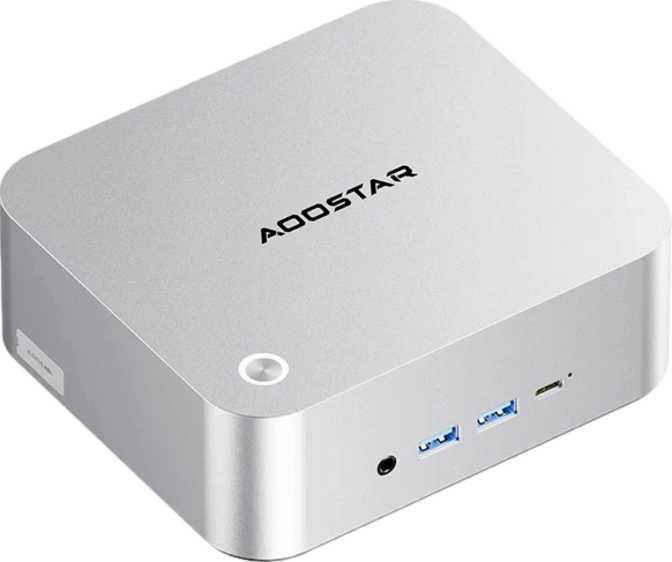
At 150 mm wide, 130 mm deep, and just 55 mm tall, the Maco 470 occupies roughly the same desk footprint as a thick hardcover novel laid flat. Its total internal volume sits just over one litre — a figure that sounds abstract until you place it next to a conventional desktop tower and realise it is roughly one-twentieth the size.

This is not a novelty. The compact chassis is a deliberate engineering choice that enables the Maco 470 to mount behind a monitor via VESA bracket, tuck under a desk, or sit unobtrusively next to a TV. For users who want a genuinely invisible computing setup, these dimensions make that possible in a way most traditional desktops cannot match.

Build quality in this tier tends toward functional aluminium-and-plastic hybrids rather than premium unibody construction. The trade-off is practical: the chassis must accommodate airflow and thermal management for a processor designed to push into meaningful performance territory. It is not a machine you buy to display as a showpiece — it is a machine you buy to disappear into your setup and work reliably.

Physical Dimensions
Width
150 mm
Depth
130 mm
Height
55 mm
Total Volume
1,072 cm³
Form Factor
Mini PC
VESA Mount
Compatible

The Processor: Laptop Efficiency, Desktop Ambitions

The heart of the Maco 470 is an AMD processor that straddles the boundary between laptop and desktop architecture — a hybrid design using two types of processing cores working in tandem. Four high-performance cores handle demanding tasks while eight efficiency-focused cores manage lighter workloads in the background. Together they deliver twenty-four processing threads, enabling the machine to juggle a substantial number of simultaneous tasks without bottlenecking.

Clock Speeds and Responsiveness

The chip reaches 5.2 GHz at peak turbo — competitive with desktop chips from a generation or two ago. In everyday terms, this means snappy application launches and smooth multitasking across a browser with dozens of tabs, a video call, and a productivity suite all running simultaneously. Its 28-watt thermal envelope enables the compact, quiet chassis while still delivering real performance.

Cache and Multithreading

Thirty-six megabytes of combined cache keeps frequently used data close to the processor, reducing the performance penalty of reaching out to slower system memory. With multithreading across all cores, software built for parallel processing — video editing, code compilation, data analysis — extracts meaningful gains. The unlocked multiplier also suggests performance tuning potential in BIOS, depending on Aoostar's implementation.

Benchmark Context

Multi-core benchmark performance exceeds 36,000 points in standardised testing, placing this machine well ahead of mid-range desktop systems from just a few years ago. The single-core score clears 4,200 — the truer measure of everyday snappiness — which is solidly in fast-feeling territory for any productivity workload. Both figures are strong for the form factor and power envelope.

5.2 GHz
Peak Turbo Clock
24
Processing Threads
36,044
Multi-Core Score
28 W
Thermal Design Power

Integrated Graphics: The Radeon 890M Changes the Conversation

The integrated Radeon 890M is not a token GPU included to tick a box. Built on a four-nanometre manufacturing process with 1,024 shader processors, it carries more GPU compute than many dedicated graphics cards from three to four years ago. This is where the Maco 470 becomes genuinely interesting for a wider audience than the form factor might suggest.

Gaming Capability

The Radeon 890M boosts to 3.1 GHz — combined with its shader count, this makes casual and moderately demanding gaming genuinely viable, a threshold that integrated graphics has not consistently crossed until very recently. Titles that were completely off the table for a machine this size are now playable at modest settings. It will not replace a dedicated gaming GPU, but for occasional gaming without buying a separate tower, it crosses a threshold that matters.

Display and Creative Work

The GPU drives up to four simultaneous displays — more than enough for even the most screen-hungry workflows. HDMI 2.1 supports 4K at high refresh rates, and full DirectX 12 and OpenGL 4.6 compliance enables hardware-accelerated encoding for video editors and photographers. The four-nanometre process also contributes to thermal efficiency — generating less heat relative to output matters significantly in a one-litre chassis.

Radeon 890M integrated GPU specifications and their real-world meaning
Specification Value What It Means
Shader Processors1,024More compute than many mid-range dedicated GPUs from a few years ago
Peak GPU Clock3,100 MHzTop-tier integrated GPU territory; directly benefits gaming and rendering
Manufacturing Node4 nmCurrent-generation efficiency; less heat and better performance per watt
Simultaneous Displays4HDMI 2.1, DisplayPort, and 2× Thunderbolt 4 — all at once
API SupportDirectX 12 / OpenGL 4.6Full hardware acceleration for modern games and professional creative apps

Memory: Fast, Generous, and Future-Ready

The Maco 470 ships with 32 gigabytes of DDR5 — the current generation of RAM technology, operating at significantly higher speeds than the DDR4 found in most competing mini PCs at similar price points. The maximum supported speed exceeds 8,500 MHz, which directly benefits the Radeon 890M: because the GPU has no dedicated video memory of its own, it draws from system RAM, and faster RAM translates directly to better graphics performance.

Thirty-two gigabytes is enough for virtually any workload short of professional video production at the highest resolutions or running multiple virtual machines simultaneously. For home users, content creators, developers, and moderate video editors, this ceiling will never become a practical constraint.

Dual-channel memory operation doubles the data throughput compared to a single-channel configuration — another factor in keeping that integrated GPU well-fed. For those with future-facing plans, the system supports expansion all the way up to 256 gigabytes, a ceiling that essentially removes memory as a long-term concern.

Memory at a Glance
Installed Capacity
32 GB
Memory Generation
DDR5
Maximum Speed
8,533 MHz
Channel Config
Dual-Channel
Maximum Supported
256 GB

Storage: Understand What You Are Getting

The included two-terabyte spinning hard drive is generous in capacity — more than enough for an extensive media library, years of documents, or a sizeable game collection. But a traditional hard drive is meaningfully slower than a solid-state drive for operating system tasks, application launches, and file access. Anyone accustomed to SSD speeds will feel this difference immediately on first boot.

The good news: an NVMe slot is present and ready to use. NVMe drives connect directly to the processor via a high-speed bus and can deliver read and write speeds ten to twenty times faster than a spinning drive. The practical recommendation is clear: add an NVMe SSD as the boot drive, relegate the existing hard drive to mass storage, and you have an extremely capable two-drive configuration.

Recommended Storage Configuration

  • NVMe SSD (add this)
    Install your operating system and applications here — this single addition transforms daily performance and unlocks the machine's true capability
  • 2 TB HDD (already included)
    Use for documents, media libraries, downloads, and large file archives where access speed is less critical
  • HDD-only boot (avoid this)
    First impressions will disappoint — the spinning drive becomes the entire system's bottleneck and colours the experience unfairly

Connectivity: A Genuine Strength at This Price Point

For a machine this small, the connectivity on the Maco 470 is exceptional — and meaningfully better than most competitors in this form factor. The port selection rewards careful examination because it is what separates this machine from cheaper alternatives that look similar on paper.

High-Speed Data and Display

Two Thunderbolt 4 ports deliver 40 gigabits per second each and support both data transfer and display output simultaneously. These ports are compatible with external GPU enclosures — should you ever want to attach a discrete graphics card — high-speed storage arrays, and full-featured docking stations that can connect an entire desk through a single cable. Two of these ports is a rare and genuinely valuable offering at this price point.

Two additional USB-A ports running at USB 3.2 Gen 2 speeds handle fast external storage and peripherals, while two legacy USB 2.0 ports cover keyboards, mice, and other low-bandwidth devices that have no need for faster connections.

Display Output Summary

Output Standard Best Use
HDMIHDMI 2.14K/144 Hz or 8K/30 Hz
DisplayPortStandardHigh-refresh monitors
Thunderbolt 4 ×240 Gbps4K monitors, docking stations
All four outputs operate simultaneously for a full four-screen setup.

Complete Port Inventory

Port / Interface Count Speed / Standard Notes
Thunderbolt 4 / USB4240 Gbps eachDisplay output, eGPU, daisy-chaining
USB-A (Gen 2)210 Gbps eachFast external storage, webcams
USB-A (2.0)2480 MbpsKeyboard, mouse, low-bandwidth devices
HDMI1HDMI 2.14K HDR and high refresh rate displays
DisplayPort1StandardDirect monitor connection
RJ45 Ethernet1GigabitStable, low-latency wired networking
3.5 mm Audio Jack1Combo headsetHeadphones and microphone in one port
Wi-FiWi-Fi 6 (802.11ax)Backward compatible to Wi-Fi 4 / 5
BluetoothBuilt-inWireless peripherals and audio devices

Who Should Buy the Aoostar Maco 470

This Machine Makes Sense For

  • Remote workers and home office users who want a capable, quiet machine that does not dominate their desk
  • Students needing full-power computing without a full-power footprint or budget
  • Home theatre PC builders who want 4K playback and multi-display support in a unit that mounts behind a screen
  • Casual gamers who want occasional gaming capability without buying a dedicated gaming machine
  • Developers and programmers who need multi-threaded performance and fast RAM for compilation and local servers
  • Anyone replacing an ageing desktop who wants a clean, minimal, clutter-free setup

Think Twice If You Are

  • A serious gamer wanting to run demanding titles at high settings — a dedicated GPU still wins here by a significant margin
  • A professional video editor working in 4K or 8K at long durations — no dedicated GPU and no NVMe boot drive will create friction
  • Someone who needs ECC memory for mission-critical data integrity — the Maco 470 does not support it
  • Anyone who needs PCIe expansion slots for capture cards, dedicated audio hardware, or other internal expansion

Competitive Positioning

The Maco 470 competes in a crowded space that includes machines from Beelink, Minisforum, and Intel NUC-style systems. The trade-off is clear: the Maco 470 sacrifices a pre-installed NVMe SSD to fund a stronger GPU, more RAM, and better connectivity. Competitors with pre-installed NVMe storage will feel faster out of the box. The Maco 470 will surpass them after a modest NVMe investment — and then hold that advantage in GPU performance and connectivity for the lifetime of the machine.

Criterion Aoostar Maco 470 Typical Competitor
GPU TierRadeon 890M — Top iGPURadeon 780M or Intel Arc
Installed RAM32 GB DDR516 GB DDR4 or DDR5
Thunderbolt 42 Ports0 – 1 ports (often absent)
Simultaneous Displays42 – 3
Storage Included2 TB HDD, no NVMe512 GB – 1 TB NVMe
CPU Threads2416 – 20

Competitor data represents typical configurations in the same price bracket. Specific models and specifications vary by retailer and revision.

Honest Assessment

Where the Maco 470 Excels

The Radeon 890M is the best integrated GPU currently available, and pairing it with DDR5 in dual-channel mode extracts everything that GPU can offer. This combination enables gaming and creative workflows that are impossible on competing mini PCs equipped with lesser integrated graphics — and does so without requiring a dedicated GPU or the heat and noise that comes with one.

The Thunderbolt 4 connectivity is rare at this price point and meaningful in practice. Two ports opens up external GPU enclosures, high-speed storage arrays, and full-featured docking stations — upgrade paths that most cheaper machines simply cannot offer. It future-proofs the purchase in a way that a machine with no Thunderbolt does not.

Processor benchmark performance places this machine ahead of desktop chips that were considered high-end not long ago — at just 28 watts. The efficiency-to-performance ratio is genuinely impressive for the form factor and stands as the strongest argument for choosing this machine over a conventional desktop.

Where It Falls Short

Arriving without an NVMe SSD is a meaningful omission. Buyers who plug this machine in expecting a smooth, fast experience and boot from the spinning hard drive will be genuinely disappointed — that drive speed is the single biggest bottleneck in this configuration, and it colours the entire first impression in a way that feels inconsistent with the rest of the hardware. The problem is solvable, but it requires awareness and additional spending that buyers may not have anticipated.

The form factor classification can mislead buyers expecting conventional desktop expandability — there are no PCIe slots, no room for additional cards, and no ECC memory support. There is also no S/PDIF optical audio output, which will be a relevant absence for certain home theatre setups. None of these are deal-breakers for the target audience, but they deserve to be stated plainly.

Questions Real Buyers Ask

The processor architecture and specification profile are fully compatible with Windows 11 requirements. The hardware supports all necessary security features and virtualisation capabilities for Windows 11 to run without workarounds or registry patches.

The maximum supported memory reaches 256 gigabytes, which strongly implies user-accessible RAM slots rather than memory soldered to the board. Buyers intending to upgrade later should confirm slot count and physical access before purchasing, as mini PC configurations can vary between production runs.

Genuinely excellent for this purpose. Twenty-four processor threads, 32 GB of DDR5 RAM, and Wi-Fi 6 make video conferencing, screen sharing, and running multiple collaboration tools simultaneously entirely unremarkable workloads. The machine will not struggle with any standard home office or remote work scenario.

At 28 watts thermal design power, the processor generates considerably less heat than conventional desktop chips. Active cooling will engage under sustained heavy workloads, but for typical office, browsing, and media consumption the noise level should remain minimal. Some variance depends on ambient temperature and ventilation.

The two Thunderbolt 4 ports are theoretically compatible with external GPU enclosures, which would dramatically expand gaming capability should the need arise. This is an advanced and costly upgrade path, but it is viable in a way that competing mini PCs lacking Thunderbolt entirely cannot match. It makes the Maco 470 a more flexible long-term purchase than its hardware might initially suggest.

Final Recommendation

The Aoostar Maco 470 is one of the most capable mini PCs at its price point — but only if you understand what you are buying and configure it accordingly.

Buy it if you are willing to add an NVMe SSD yourself. That single addition transforms this machine from capable-but-sluggish into a genuinely fast, well-rounded computer that punches significantly above its size. The GPU performance, memory configuration, and connectivity suite are all best-in-class for the form factor.

Approach with caution if you want a plug-and-play experience straight from the box — the spinning hard drive will frustrate anyone accustomed to SSD speeds, and first impressions matter. For the right buyer, the Radeon 890M integrated graphics, dual Thunderbolt 4 ports, 32 GB of DDR5, and four-display output capability add up to a machine that competes with systems costing considerably more. The compromise is not in the hardware ceiling — it is entirely in how you configure it from day one.

Overall Verdict
8.2
/10
Recommended with Caveats
  • Best-in-class integrated GPU (Radeon 890M)
  • 32 GB DDR5 and dual Thunderbolt 4 ports
  • Four-display output in a one-litre chassis
  • Strong multi-core and single-core benchmarks
  • Add an NVMe SSD before first use
Arjun Sharma Mumbai, India

Storage & SSD Performance Reviewer

Data storage engineer and cloud infrastructure specialist who benchmarks SSDs, NAS drives, and portable storage solutions under real-world workloads. Delivers transfer-speed comparisons and endurance ratings that go far beyond manufacturer specs.

SSDs Storage Solutions PC Components Data Recovery Cloud Hardware
  • AWS Certified Solutions Architect
  • MSc in Data Engineering
View Full Profile