YUNZII Madlions Mad68 HE Review: A Full Hall Effect 65% Keyboard Test

YUNZII Madlions Mad68 HE Review: A Full Hall Effect 65% Keyboard Test

Keyboards

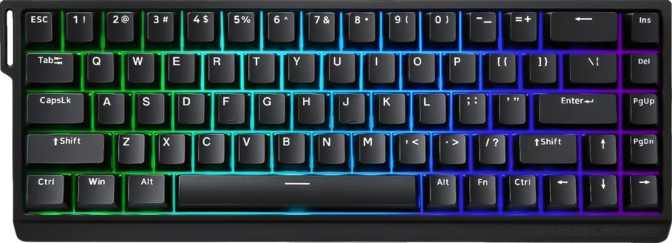
Hall effect keyboards have moved from enthusiast curiosity to genuine competitive tool, and the market is crowded at every price point. The YUNZII Madlions Mad68 HE enters as a compact, feature-loaded 65% board targeting players who want tournament-grade input precision without committing to a full-size layout — bringing rapid trigger, dual actuation, adjustable actuation, analog input, and 8000 Hz polling in a gasket-mounted, aluminum-reinforced chassis. Here is what that adds up to in practice.

At a Glance

8000 HzPolling Rate
65% CompactLayout with Arrows
Hall EffectSwitch Technology
Gasket MountCushioned Plate
0.1–3.8 mmActuation Range
Hot-SwapHE Switch Support

Design and Build Quality

A Compact Layout with Practical Intent

The Mad68 HE uses a 65% form factor — the format enthusiasts call "compact with arrow keys." You lose the numpad, the function row, and the navigation cluster above the arrows, but retain every key a competitive player or working typist actually uses. The result is a board that is meaningfully smaller than a tenkeyless layout while staying fully practical without forcing obscure layer shortcuts into muscle memory.

The 320 mm width is genuinely desk-friendly, leaving real room for mouse movement — which matters if you play at lower sensitivities and need that mat space.

Materials and Structural Integrity

The case combines plastic and aluminum construction, with an aluminum plate handling the switch-mounting layer internally. The plate provides rigidity and a firm, high-density foundation for the switches, while the outer case material manages overall weight without making the board feel hollow or cheap.

At 830 grams, the Mad68 HE sits in a range enthusiasts describe as substantial without being punishing. That weight keeps the board planted during heavy gaming and typing — no skidding, no shifting. It comes in two colorways, Black and White, both built to the same material specification throughout.

Why the Gasket Mount Matters

Rigid-mount keyboards transmit keystroke impact directly through the case, creating a harsher feel and louder acoustics. A gasket mount suspends the plate and PCB inside the outer shell on soft pads, absorbing that impact rather than reflecting it. The result is a softer, slightly bouncy typing feel with noticeably reduced acoustics — meaningful for anyone using this board beyond short gaming sessions.

Physical Specifications
  • Width320 mm
  • Depth116 mm
  • Height37 mm
  • Weight830 g
  • Case MaterialPlastic + Aluminum
  • Plate MaterialAluminum
  • Mount TypeGasket
  • Color OptionsBlack, White
  • CableDetachable USB
  • RGB Lighting
  • Adjustable Tilt
  • Wrist Rest Included
  • USB Passthrough
  • Warranty1 Year

The Switches: Hall Effect Technology Explained

What Hall Effect Means — and Why It Matters

Most gaming keyboards use physical contact switches — two metal contacts meet when you press a key, complete a circuit, and register a keystroke. Over time those contacts wear, accumulate debris, and develop inconsistency. The Mad68 HE takes a fundamentally different approach.

Hall effect switches replace that physical contact with a magnet and a sensor. A magnet embedded in the stem moves past a Hall effect sensor as the key is pressed. The sensor detects the change in magnetic field and tracks the stem's position with extremely high precision — continuously, not at a single fixed contact point. There is no contact to wear out, no electrical bounce from metal meeting metal, and no actuation depth baked permanently into the hardware.

This continuous positional sensing is the foundational reason the Mad68 HE can offer adjustable actuation, rapid trigger, and analog input — capabilities that are physically impossible with conventional contact switches.

Magnetic Amber Pro: Feel and Character

The Magnetic Amber Pro switches inside this board are linear hall effect switches. Linear means the keystroke motion is smooth from top to bottom with no tactile bump or audible click to interrupt the travel. For gaming, linear feel is generally preferred because the absence of a bump removes mechanical resistance that could marginally slow rapid, repeated keypresses.

The actuation force is notably light — lighter than a Cherry MX Red and significantly lighter than heavier linear variants. This reduces finger fatigue during long sessions but means accidental keypresses are more likely if you rest fingers on keys. Users transitioning from heavier switches should expect a brief adjustment period.

Switch Specifications
  • Switch NameMagnetic Amber Pro
  • TechnologyHall Effect
  • FeelLinear
  • Actuation Force37 g
  • Min. Actuation0.1 mm
  • Max. Actuation3.8 mm
  • Total Travel3.8 mm
  • Hot-SwappableYes

Hot-Swap Compatibility Note

Hot-swap support is exclusive to hall effect switches. Standard contact switches are not compatible with a hall effect PCB. Any replacement or upgrade switches must also be hall effect variants.

Performance Features: The Technical Core

Hall effect technology enables a feature set contact keyboards cannot replicate. The Mad68 HE ships with the full suite.

Adjustable Actuation

Set any actuation point between 0.1 mm and 3.8 mm — per key if needed. At the 0.1 mm minimum, inputs register on the lightest brush of a key. At the maximum, only a fully bottomed keystroke fires. Assign different depths to different keys for games with layered inputs.

Rapid Trigger

On a standard keyboard, a key stays registered until you lift it past a physical reset point — creating a dead zone on release. Rapid trigger eliminates this: the moment you begin moving the key upward, it deregisters; the moment you press again, it fires. For competitive shooters, this translates to faster directional corrections and cleaner counter-strafing.

Dual Actuation

Assign two distinct actions to one physical key at different press depths. One key can trigger a walk at 1.5 mm and a sprint at 3.5 mm — no second key needed. This enables layered controls for games where multiple movement states map logically to the same key at different intensities.

Analog Input

Rather than binary on/off key states, analog mode reads the continuous position of the key throughout its travel and maps it to a proportional value — similar to a gamepad thumbstick. In supported titles, partial key presses produce partial inputs: partial throttle, partial lean, partial aim. A niche capability that meaningfully expands what a keyboard can do.

N-Key Rollover

Every key pressed simultaneously registers accurately — no limit, no ghosting, no dropped inputs. For gaming, complex multi-key combinations never result in missed actions. For fast typists, NKRO eliminates the occasional lost character that keyboards with input rollover limits would otherwise drop at speed.

8000 Hz Polling

Standard keyboards report their state once per millisecond. At 8000 Hz, the Mad68 HE reports eight times per millisecond, shrinking the window in which a fast keypress could fall between polling cycles. The difference is perceptible mainly at elite competitive levels — but for high-level players where hardware limits approach reaction-time limits, the reduced worst-case latency is a real advantage.

Keycaps and Layout

PBT Double-Shot Construction

The keycaps are PBT plastic with double-shot legends. PBT is the preferred keycap material for serious users — denser and harder than the ABS plastic used on many budget boards, meaning it resists the surface shine that develops on frequently touched keys over time. ABS caps develop a greasy, worn appearance within months of heavy use; PBT caps maintain their texture far longer.

Double-shot legends means the characters on each key are formed from a second layer of plastic injected during manufacturing — not printed or laser-etched on the surface. The legends cannot wear off because they go all the way through the keycap material. Combined with the RGB backlighting underneath, double-shot construction also ensures clean, even light diffusion through the characters.

OEM Profile and Layout Compatibility

The keycap profile is OEM — a slightly taller, sculpted profile where keys at different rows are angled to match the natural resting curve of your fingers. OEM is widely familiar from standard keyboards and sits in a comfortable middle ground that most users find immediately natural without any adaptation period.

The keyboard uses standard ANSI layout with standard key sizing throughout. Virtually every aftermarket keycap set supports this sizing, so you are never locked into YUNZII-specific caps. The existing PBT double-shot caps are already a quality tier above what many boards include — but the option to swap is fully open.

Keycap Specifications
  • MaterialPBT Plastic
  • Legend MethodDouble-Shot
  • ProfileOEM
  • LayoutANSI (US)
  • Standard SizingYes
  • BacklitRGB Per-Key
  • Aftermarket CompatibleYes
  • Designed for Mac
  • Media KeysVia Fn Layer
  • Rotary Dial

Who This Keyboard Is For

Built for These Users
  • Competitive FPS and Tactical Shooter PlayersThe 0.1 mm minimum actuation, rapid trigger, and 8000 Hz polling represent the current ceiling of keyboard hardware for this use case. Every feature here is directly relevant to players who measure their inputs in milliseconds.
  • Daily Typists Who Want Desk EfficiencyThe gasket mount, 65% layout, and PBT keycaps make the Mad68 HE a capable daily driver. The board holds up to heavy use without visual degradation, and the compact footprint keeps your workspace practical.
  • Enthusiasts Who Want to ExperimentPer-key actuation customization, hot-swappable hall effect switches, and analog input give technically curious users considerable room to explore and tune the board to exact preferences.
  • Users Comfortable with Proprietary SoftwareIf you have no dependency on open-source firmware ecosystems and are happy using YUNZII's configuration tool, the hardware package here is genuinely strong.
Will Frustrate These Users
  • QMK / VIA / ZMK Firmware UsersThe Mad68 HE does not support any open-source firmware ecosystems. Complex keymap configurations, tap-dance sequences, and layer setups built around these tools cannot be replicated here.
  • Mac UsersNo dedicated Mac modifier keys, and configuration software built around Windows. Basic typing functions, but the board is effectively unsupported on macOS in any meaningful sense.
  • Users Who Require WirelessWired only, by design. There is no Bluetooth or wireless mode, and none can be added aftermarket. If a cable-free setup matters to you, this board cannot deliver it.
  • Tactile or Clicky Switch EnthusiastsThe Magnetic Amber Pro is strictly linear. Hall effect tactile switches remain a narrow and developing market segment, so tactile options within this hot-swap ecosystem are very limited.

Competitive Context

How the Mad68 HE positions itself within the hall effect keyboard category relative to common board archetypes. Competitor columns reflect category norms, not specific named products.

FeatureMad68 HEVIA-Supported HE BoardRigid-Mount HE Board
Mount TypeGasketVaries (top or tray)Rigid
Polling Rate8000 Hz1000–4000 Hz1000–8000 Hz
Rapid Trigger
Dual ActuationVariesVaries
VIA / QMK SupportVaries
Hot-Swap (HE)VariesVaries
Detachable Cable
PBT KeycapsVariesVaries

Honest Assessment: Strengths and Weaknesses

Where It Delivers

The technical feature set is genuinely complete. Rapid trigger, dual actuation, adjustable actuation from an exceptionally shallow minimum, analog input, and 8000 Hz polling are all present — none artificially limited. For a wired hall effect board, that is the right package.

The gasket mount is a meaningful differentiator. Many hall effect boards at competing price points use rigid mounts, which transmit impact harshly and amplify acoustics. Choosing gasket mounting is a quality-of-life commitment that improves both feel and sound over the long term.

Hot-swap support extends the board's useful life considerably. Hall effect technology is still maturing, and being able to install newer or differently-tuned switches without replacing the board is genuine forward compatibility at no extra cost.

The PBT double-shot keycaps are a notable inclusion at this tier. ABS caps on competing boards develop visible wear within months of heavy use; PBT maintains its texture and appearance far longer.
Where It Falls Short

The absence of QMK, VIA, or ZMK support is a genuine limitation for a meaningful segment of the enthusiast audience. Proprietary software means customization is bounded by what YUNZII has implemented and continues to maintain. If support is discontinued, advanced configuration becomes locked in its last firmware state.

The one-year warranty period is modest for a board marketed at enthusiasts who may use it intensively. A longer coverage window would inspire more confidence. It is not a dealbreaker, but it is worth factoring into the purchase decision.

No USB passthrough means the board's USB connection is solely its own. Users who run mice or headsets through a keyboard hub will need another arrangement — which can be inconvenient with a 65% board's minimal desk footprint.

Wired only. For most competitive contexts this is neutral, but users who want a cable-free desk setup will need to look elsewhere.

Questions Real Buyers Ask

In movement-heavy competitive games — particularly tactical shooters — yes, the difference is perceptible once you have used it. The ability to directionally correct without waiting for a switch to physically reset is genuinely useful at skilled play levels. In casual gaming or non-movement-intensive contexts, the practical difference is smaller. The feature is real; whether it matters depends on how competitively you play.

Yes. The 65% layout, gasket mount, PBT keycaps, and standard ANSI sizing all make the Mad68 HE a capable daily driver. The linear switches at 37 g are on the lighter side for heavy typists — some users find light switches fatiguing over long sessions because there is less tactile resistance to prevent bottoming out — but this is a personal preference matter rather than a flaw in the board.

YUNZII provides proprietary configuration software for setting actuation points, rapid trigger behavior, and dual actuation assignments. Since the board does not support VIA, QMK, or ZMK, you are dependent on this software for advanced customization. Basic typing and standard gaming functions work without any software installed — but you will not access the board's performance features without the configuration tool.

Yes. Standard ANSI layout and standard key sizing mean virtually every aftermarket keycap set is directly compatible. You can swap to Cherry, OEM, or other profiles freely. The existing PBT double-shot caps are a quality tier above what many boards include at this price point — there is no urgency to replace them — but the option is fully open.

For most users, no. The difference between 1000 Hz and 8000 Hz is at the margins of human perception and matters most to elite-level competitive players. If your system is older or has limited USB bandwidth, 1000 Hz mode will perform identically to the average user's experience. The high polling rate is a ceiling capability, not a daily requirement — and it does not affect rapid trigger, adjustable actuation, or any other core features.

Yes, via USB. The board functions normally on a laptop through a standard USB connection. Performance at 8000 Hz polling may vary depending on the laptop's USB controller — some older implementations may not sustain the higher rate without elevated CPU load. Core features including rapid trigger and adjustable actuation are not affected by this limitation.

Final Verdict

The YUNZII Madlions Mad68 HE — strong hardware, with one important caveat.

8.3/ 10

Overall Score

YUNZII Madlions Mad68 HE

Category Scores

Build Quality9.0
Switch Technology9.5
Feature Set9.0
Firmware Openness6.0
Value for Money8.0

The YUNZII Madlions Mad68 HE is a technically well-specified hall effect keyboard that delivers on the features it advertises. The switch technology is genuine, rapid trigger and adjustable actuation work as described, the gasket mount meaningfully improves the typing experience over rigid alternatives in this category, and the PBT double-shot keycaps reflect a quality commitment that cheaper boards skip.

The trade-off is firmware openness. If you are comfortable using YUNZII's proprietary software and have no dependency on QMK or VIA ecosystems, the Mad68 HE presents a strong hardware package. If open firmware is a requirement — if you want full control through community-supported tools — this board cannot accommodate that, regardless of how capable its switches are.

Buy it if...

  • You compete in FPS or tactical shooters
  • You want a compact gaming and typing board
  • Open firmware is not a requirement for you

Skip it if...

  • You rely on QMK, VIA, or ZMK firmware
  • You need wireless connectivity
  • You prefer tactile or clicky switches
Elif Kaya Bursa, Turkey

PC Gaming Headset & Surround Sound Reviewer

Audio engineer and competitive gaming analyst who reviews PC and console headsets for positional audio accuracy, microphone clarity, and comfort during multi-hour sessions. Conducts blind listening tests with panel groups to eliminate brand bias from her verdicts.

Gaming Headsets Surround Sound Microphone Quality Headset Comfort Positional Audio
  • BA in Sound Engineering
  • AES Student Member
View Full Profile