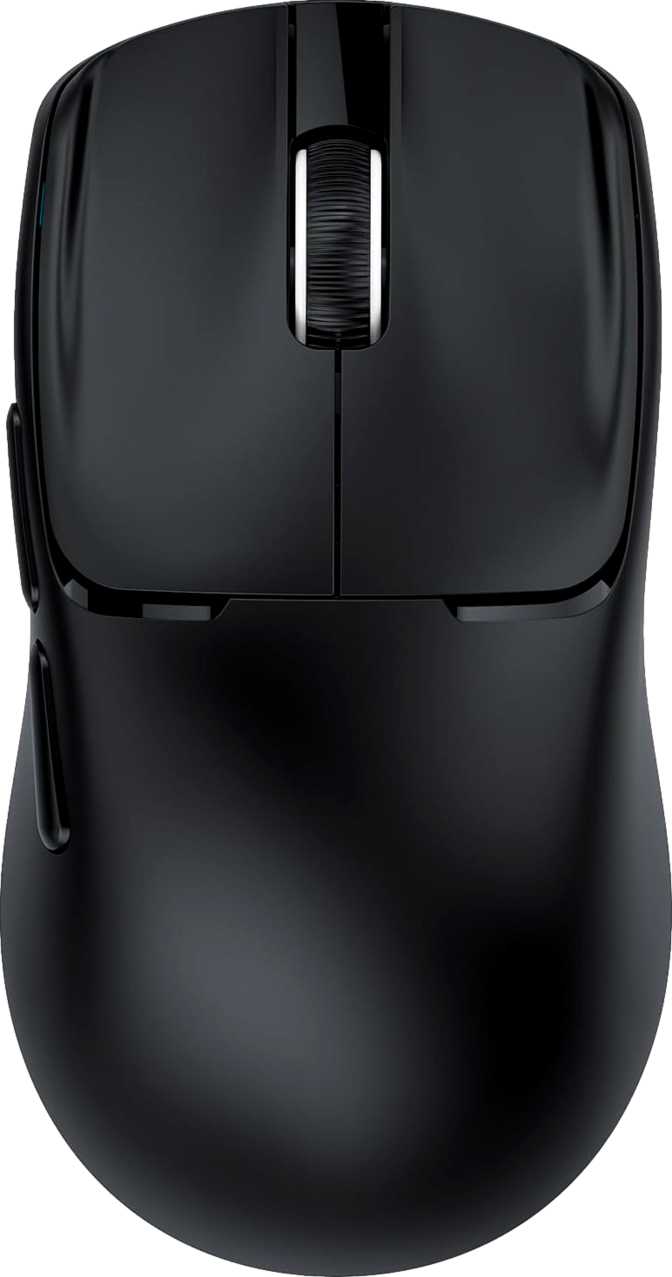
The productivity mouse category is cluttered with devices that try to be everything — and usually end up being nothing in particular. The Rapique R102 moves in the opposite direction. No lighting effects, no adjustable weights, no gaming-adjacent design language — just a feather-light, ambidextrous wireless mouse engineered around the actual needs of someone who works across multiple devices, moves between environments, and wants a pointing device that simply disappears into the day.
That approach only holds up if the fundamentals are solid. The question worth asking is whether the R102's deliberate restraint is a genuine design philosophy or just a budget shortcut. The answer, as with most things, is nuanced — and worth understanding before spending money.
Design and Build: When Thin Is a Feature, Not a Compromise
Flat by Design
The first physical detail that distinguishes the R102 from most wireless office mice is how low it sits. At 28mm off the desk, it is noticeably flatter than the typical productivity mouse, which usually rises between 38mm and 42mm at its highest point. This is not an oversight — it is the defining ergonomic choice of the entire product.
That flat profile makes the R102 a natural fit for fingertip grip and claw grip users: people whose palm rests on the desk rather than arching over the back of the mouse. If you already hold your mouse near the front with your fingers doing most of the guiding work, you will find the R102 slides into that habit without friction. If you are accustomed to wrapping your full palm over a tall, arched mouse, the adjustment period is real and worth knowing about before purchasing.
Dimensions and Hand Compatibility
At 119mm long and 63mm wide, the footprint is on the compact side of adult-sized productivity mice, many of which stretch to 125mm or beyond. The result is a mouse that fits small-to-medium hands comfortably and remains manageable for larger hands, though users with large hands may find the overall reach slightly abbreviated compared to what they are used to.
Combined with the 28mm height, the overall volume is compact — this is a mouse that takes up less visual and physical space on a desk than most competitors, and fits easily into any bag side pocket without requiring a dedicated compartment.
53 Grams: This Is Genuinely Light
Weight is one of those specifications that reads as a number until you consider what it means across eight hours of use. A standard AA battery weighs roughly 23 grams. The R102, at 53 grams, is heavier than two of them by about seven grams. That is light — meaningfully, noticeably light in the hand.
The cumulative benefit of a low-weight mouse becomes apparent toward the end of long workdays. The micro-effort of lifting and repositioning a mouse hundreds of times per hour adds up as forearm and wrist fatigue. Users who have experienced soreness or stiffness after heavy mouse use will find the R102's weight profile directly addresses that mechanism.
No RGB, No Weights — Both Are Deliberate Omissions
The R102 carries no LED lighting and no user-accessible weight system, and both absences are positive trade-offs at this product's purpose. The absence of RGB removes a source of battery drain, directly contributing to the strong endurance the R102 achieves. It also makes the mouse appropriate for professional environments — shared offices, client meetings, recording studios, classrooms — where a glowing peripherals aesthetic would be out of place.
The lack of adjustable weights keeps the chassis light and mechanically simple. Weight customization matters primarily for gaming — it has almost no practical relevance to document editing or spreadsheet navigation, which is what this mouse was built for.
Ambidextrous Symmetry
The symmetrical form accommodates left-handed and right-handed users without forcing either group to compromise. The body shape is genuinely neutral and does not favor one side over the other. Left-handed users in particular, who are frequently underserved by a market that skews heavily right-handed, will appreciate a mainstream productivity option that treats both orientations as equal. Verify the side button placement with the manufacturer for your intended grip orientation before purchasing.
Connectivity: Three Modes, One Mouse
The R102's connection flexibility is its most versatile specification. Three modes — 2.4GHz wireless via a USB dongle, Bluetooth 5.1, and wired USB — cover essentially every working environment a modern professional operates in.
2.4GHz Dongle
The fastest and most stable wireless option. Sends position data 125 times per second — response indistinguishable from wired in any productivity task. The mode for your primary machine.
Bluetooth 5.1
Connects to tablets, secondary laptops, or smart TVs without occupying a USB port. Version 5.1 delivers improved stability over older Bluetooth implementations found in competing mice.
Wired USB
A zero-wireless fallback and the charging interface simultaneously. Plug in and keep working — there is no forced downtime between a dead battery and a functioning device.
Performance: Right-Sized for the Job
Sensitivity Range in Real Terms
The R102 operates across two DPI settings: a lower, more controlled mode and a higher, faster-sweeping mode. DPI — dots per inch — describes how far your cursor travels on screen for each inch the mouse physically moves. Higher DPI means more screen distance per movement; lower DPI means finer, more deliberate cursor control.
- Dragging and dropping files precisely
- Careful cell selections in spreadsheets
- Placing elements in design software
- Clicking small UI targets accurately
- Sweeping across large monitor surfaces
- Multi-monitor workspace navigation
- Standard 1080p and 1440p displays
- General everyday document navigation
Polling Rate in Context
The R102 reports its position to the computer 125 times every second — the standard for productivity mice and entirely appropriate for all tasks in that category. The higher rates found in gaming mice exist to reduce input lag during fast reflex-based interactions. For writing a report, navigating a dashboard, or building a slide deck, the difference is imperceptible. As a secondary benefit, the conservative polling rate contributes meaningfully to battery longevity and introduces minimal CPU overhead.
Battery: The Kind of Endurance That Removes a Problem From Your Life
Seventy hours of active-use battery life maps, in real working terms, to approximately eight or nine full working days before a charge is needed. For most desk workers, the R102 needs charging once every week to week-and-a-half — a weekly background chore, not a daily obligation or an anxiety-producing bar you watch deplete.
This figure is the direct arithmetic of the R102's design choices: no power-hungry LEDs, a conservative polling rate, and a clean sensor with no complex overhead. Each of those decisions — which some buyers might view as feature removals — compounds into this battery outcome.
Who the R102 Is For — and Who Should Look Elsewhere
- Work across multiple devices and want one mouse without USB port conflicts or dongle juggling
- Travel regularly and want the lightest viable wireless mouse that will not notice itself in a bag
- Are left-handed and have grown tired of mice that treat left-handedness as an afterthought
- Work in professional environments where understated, no-glow hardware is the appropriate choice
- Experience wrist or forearm fatigue with heavier mice and want to reduce that load without sacrificing features
- Value battery longevity over feature density and prefer not thinking about charging
- Play games, even casually — the sensor range and polling rate are not suited for fast-paced gaming
- Use a large 4K monitor at native resolution where the sensitivity ceiling may feel limiting without OS adjustment
- Need identical custom button behavior on every machine you connect to without installing software
- Are accustomed to a tall, palm-filling mouse shape and do not want to adapt to a 28mm flat profile
- Work on locked-down workplace computers where installing companion software is not possible
How It Compares to the Logical Alternatives
| Feature | Rapique R102 | Typical Entry Wireless | Typical Mid-Range Multi-Device |
|---|---|---|---|
| Connectivity | 2.4GHz + BT + USB | 2.4GHz only | 2.4GHz + BT (1–2 devices) |
| Weight | 53g | 80–110g | 70–95g |
| Active Battery Life | ~70 hours | 18–30 hours | 40–70 hours |
| Programmable Buttons | All 6 | 0–2 | 2–4 |
| Onboard Profiles | None | None | Often 2–3 |
| Ambidextrous | Yes | Rarely | Occasionally |
| RGB Lighting | No | Rare | Sometimes |
Comparison values represent typical category averages and are intended as general guidance only.
Honest Strengths and Real Weaknesses
The R102's strongest quality is coherence. Every specification connects to every other one. The low weight is enabled by the absence of LEDs, heavy weights, and a large battery pack. The long battery life is enabled by the conservative polling rate and the absent LEDs. The professional aesthetic is enabled by no RGB. None of the feature omissions feel arbitrary — each one is the cost paid for a benefit that shows up elsewhere in the product.
The six-button full programmability is a genuine differentiator that the competition does not reliably match at this tier. Getting every button including the DPI toggle into the remappable set meaningfully increases the useful surface area of the hardware.
The weaknesses cluster around one theme: ceiling. The sensitivity range tops out at a level that is genuinely sufficient for standard monitor setups but limiting on large, high-resolution displays. The polling rate is appropriate for productivity but offers no headroom beyond it. The onboard memory is nonexistent, which matters more as you add devices to the Bluetooth rotation. For a user whose needs stay inside the design boundaries, none of this registers as a problem. For a user approaching those boundaries — particularly on a 4K large-format monitor — the ceiling becomes a real constraint.
The flat 28mm profile will split buyers cleanly: you will either find it natural and comfortable, or unfamiliar enough to affect daily use. This is not a small detail to discover after purchasing.
What Works Well
- Exceptional weight — among the lightest productivity mice available
- True tri-mode wireless covering every common connection scenario
- Battery endurance that makes charging a weekly background task
- All six buttons fully programmable — unusual at this tier
- Genuinely ambidextrous — no compromises for left-handed users
- Usable while charging — zero forced downtime
Where It Falls Short
- Sensitivity ceiling may feel restrictive on large 4K displays
- No onboard memory — custom settings don't travel between machines
- Non-removable battery means long-term replacement needs service
- Flat 28mm profile requires grip-style adjustment for palm-grip users
- No hardware profile switching — single workflow per machine
- Software required for customization — restricts use on locked-down PCs
Questions Real Buyers Search For
Final Verdict
The Rapique R102 is a well-considered tool for a specific kind of user, and it delivers for that user in the ways that matter most. The weight is genuinely exceptional. The three-mode connectivity is complete and practical. The battery endurance removes recharging from the daily mental load. The full programmability of all six buttons is a quiet differentiator that becomes apparent once you start configuring shortcuts.
The limitations are real but bounded: the sensitivity ceiling will constrain users on large 4K monitors, the absent onboard memory affects users who need identical custom settings across multiple machines, and the flat 28mm profile will not suit everyone's grip. These are not hidden flaws — they are the direct, logical consequences of what the R102 chose to prioritize.
Buy it if:
You want the lightest reliable multi-mode wireless mouse available, with strong battery life and complete button programmability, and you work primarily on standard-resolution displays.
Look elsewhere if:
You need a higher sensitivity ceiling for a large 4K display, software-free cross-device portability, or a tall arched form factor. The R102 knows exactly what it is — and within those boundaries, it executes with clarity.