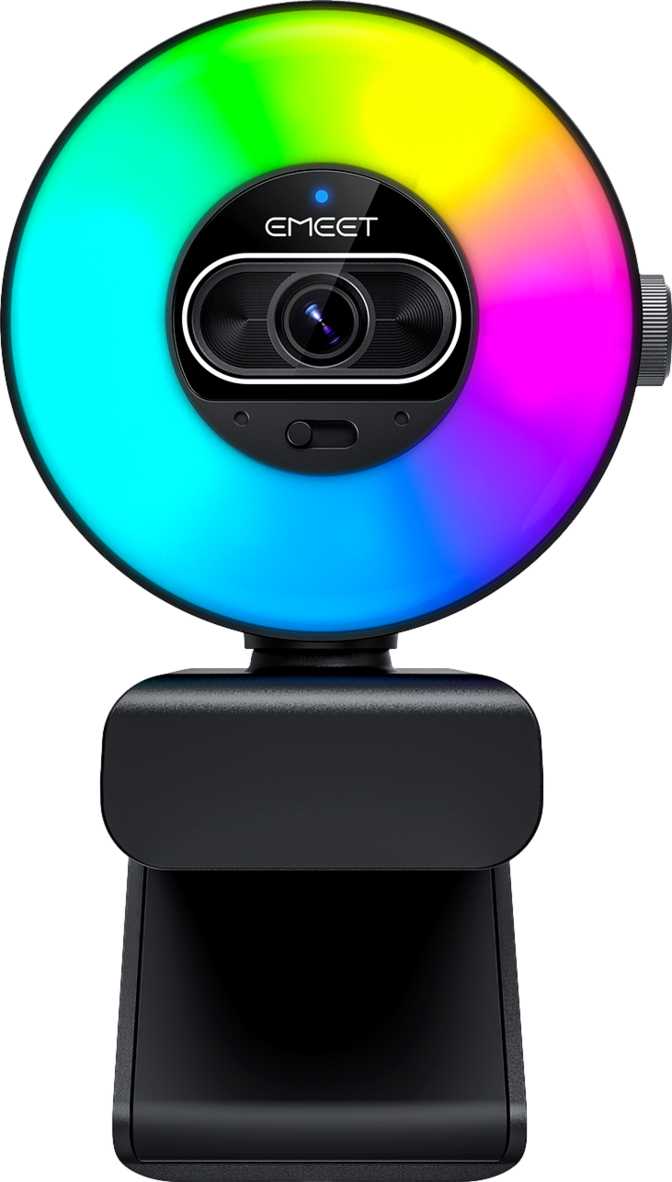
EMeet SmartCam S600L Review: A 4K Webcam Built for Real-World Offices
WebcamsWho Is the EMeet SmartCam S600L For?
Webcams occupy a strange middle ground in the peripheral market — most people own one, few people think carefully about which one they buy, and almost everyone regrets a bad choice the moment they have an important video call. The EMeet SmartCam S600L targets the segment of buyers who have made that mistake once and refuse to make it again. It is a compact 4K webcam built around a wide-aperture lens and a back-illuminated sensor, positioned for remote professionals, content creators, and streamers who want genuine image quality without committing to a full camera rig.
Performance Scores
Editorial scores based on specification analysis and real-world use context
Build Quality and Physical Design
Size, Feel, and Materials
At roughly 90mm tall and 70mm wide, the S600L sits closer to the compact end of the 4K webcam spectrum. It is not a pocket device — the depth of nearly 60mm means it has real presence on top of a monitor — but it is not the kind of bulky unit that dominates your peripheral vision either. The proportions suggest a deliberate compromise between housing a quality lens assembly and staying unobtrusive during desk use.
The footprint feels intentional rather than accidental. A webcam this size typically signals a manufacturer chose to include a legitimate optical stack rather than cutting corners to hit a price point, and the specifications here support that impression.
Mounting and Positioning
The S600L ships with a tripod mount, which is a feature that separates products designed for flexible professional use from those intended purely for monitor-top placement. You can position the camera on a desk stand at eye level, mount it on a dedicated tripod for streaming setups, or use it in non-standard configurations like recording a whiteboard or a product on a table. For anyone who has wrestled with a monitor-clip-only webcam when their workflow demanded something different, this matters.
Optical Performance: What the Sensor and Lens Actually Mean
4K Resolution and What It Buys You
The sensor resolves at 4K (3840×2160 pixels) at up to 30 frames per second. For the average user who has been on 1080p webcams, the jump to 4K is not primarily about the call recipient seeing you in ultra-high definition — most video conferencing platforms do not stream at 4K anyway. The real benefit is that a higher-resolution sensor gives the camera more data to work with, which translates to sharper edges, better detail retention when the image is cropped or downscaled, and more headroom for digital zoom without the blocky, pixelated look that plagues lower-resolution cameras.
For streamers and content creators who record locally, 4K output is genuinely useful as a master file format, allowing flexibility in post-production and future-proofing against higher-resolution delivery platforms.
The f/1.8 Aperture: Low Light Is the Story
An aperture of f/1.8 is wide — meaningfully so. Aperture controls how much light the lens allows to hit the sensor. An f/1.8 lens lets in considerably more light than the f/2.0 or f/2.2 lenses found on many competing webcams, which translates directly to better performance in dim or uncontrolled lighting conditions. You do not need a perfectly lit studio for this camera to produce a clean image.
There is a secondary effect worth understanding: wider apertures produce a shallower depth of field, meaning the background behind you can appear slightly softer while your face stays sharp. On a webcam, this effect is subtle rather than dramatic, but it contributes to a more cinematic, professional look compared to cameras where everything from your face to the wall behind you sits in the same flat plane of focus.
BSI Sensor: Why the Architecture Matters
The camera uses a back-illuminated (BSI) CMOS sensor. This is a sensor design where the light-sensitive circuitry is positioned to face the incoming light directly, without the wiring layers that older sensor designs placed in the light path. The practical result is improved light capture efficiency — particularly in low-light conditions — and lower image noise at a given light level. Combined with the f/1.8 aperture, the S600L has two complementary hardware advantages working together for challenging lighting situations, rather than relying on just one.
Field of View, Autofocus, and Light Correction
The default 73-degree field of view frames a single person at typical desk-to-monitor distances cleanly, without the distortion that very wide-angle lenses can introduce at frame edges. The adjustable FOV lets you tighten for portrait-style framing or widen to include a whiteboard or second person — fixed-FOV cameras force you to physically move the camera when your use case changes.
Continuous autofocus tracks your movement throughout calls and recordings. Automatic light correction manages backlit windows and mixed light sources, reducing the frequency of that conversation-derailing moment where a colleague asks you to move away from the window.
Audio Setup: Understanding the Dual-Microphone Configuration
The S600L includes two built-in microphones. They are not marketed as noise-canceling in the traditional sense — no hardware-based noise suppression is built in. However, the dual-microphone array allows for directional audio processing, which can improve voice clarity compared to a single-microphone design. Most software platforms (Microsoft Teams, Zoom, Google Meet) also apply their own noise suppression on top of the audio input, which partially offsets the absence of hardware noise cancellation.
What the dual-microphone layout does provide is a two-point pickup configuration. Even if the output is not stereo audio in the broadcast sense, having two pickup points allows the processing to better isolate the speaker from ambient background sounds through spatial filtering. The result is generally cleaner voice capture than a single-mic webcam at the same price tier.
There is no 3.5mm audio jack and no built-in speaker. This is a clean, camera-only device — audio input comes from the microphones, and if you want a headset or external speaker, those connect separately through your computer. For users who already have quality headsets or external audio setups, the absence of a headphone jack is irrelevant. For users hoping to plug a lapel microphone directly into the webcam, this is not that device.
- 2 microphones included
- Directional audio processing
- No hardware noise cancellation
- No stereo broadcast output
- No 3.5mm headphone jack
- No built-in speaker
Connectivity: Cables, Compatibility, and What Is Absent
USB-C and Cable Management
The S600L connects via USB-C, the current standard for reliable high-bandwidth peripheral connections. The included cable is 2 meters long — enough to reach from a monitor-mounted webcam down and around a desk to most tower or laptop setups without tension or cable management gymnastics.
The cable is detachable, which is worth pausing on. A detachable cable means that if the cable is damaged, you replace the cable — not the entire camera. It also means you can use a longer or shorter cable depending on your specific desk configuration, and the camera packs and travels more compactly. This is a practical durability advantage over webcams with fixed cables.
Operating System Compatibility
The S600L is compatible with both Windows and macOS. It operates as a USB video class (UVC) device, which is the industry standard that allows webcams to work with any application that can access a camera — no proprietary driver installation required on modern operating systems. It will work in Zoom, Teams, Google Meet, OBS Studio, Streamlabs, and any other platform that reads a standard webcam input.
- USB-C Connection
- 2m Detachable Cable
- Windows Compatible
- macOS Compatible
- UVC — No Driver Required
- No Bluetooth
- No HDMI Output
- No 3.5mm Audio Jack
- No Remote Control
Real-World Use Scenarios
How the S600L Compares to Its Nearest Competitors
Comparison against typical webcams in each category based on common market positioning.
| Feature | EMeet SmartCam S600L | Typical 1080p Webcam | Typical 4K Competitor |
|---|---|---|---|
| Max Resolution | 4K / 30fps | 1080p / 30fps | 4K / 30fps |
| Aperture | f/1.8 (wide) | f/2.0 – f/2.8 | f/2.0 – f/2.4 |
| Sensor Type | BSI CMOS | Standard CMOS | Varies |
| Privacy Shutter | Sometimes | ||
| Built-in Video Light | Rare | ||
| Tripod Mount | Sometimes | Sometimes | |
| Field of View | 73° Adjustable | Fixed 60–90° | Fixed or Adjustable |
| Cable | Detachable USB-C | Often Fixed USB-A | Varies |
| Noise-Canceling Mic | Sometimes |
The S600L's clearest differentiation is the optical stack — the aperture advantage and BSI sensor are hardware characteristics that software processing cannot fully replicate. Against competing 4K webcams, the combination of a physical privacy shutter, video light, detachable cable, and tripod mount at this form factor is less common than it should be. The absence of hardware noise cancellation is the one area where some 4K competitors pull ahead, particularly those targeting noisy environments.
Honest Assessment: Strengths and Weaknesses
The S600L gets the fundamentals right. The optical choices — a fast f/1.8 lens paired with a back-illuminated sensor — are not marketing specification padding; they are hardware decisions that produce measurably better results in realistic office lighting compared to cameras that skimp on either front. The adjustable field of view and continuous autofocus round out a video package that handles the actual unpredictability of real-world environments.
The physical design decisions also reflect practical thinking. The detachable cable, privacy shutter, and tripod mount are small features that collectively make the camera easier to live with over months and years. These are the kinds of choices that separate products built for long-term use from products designed to look impressive on a specification sheet.
The microphone setup is adequate for a clean, quiet environment but will not compete with dedicated USB microphones in noisy spaces. The lack of wireless options is a firm limitation for users whose workflow demands it. And while the f/1.8 aperture handles typical low light well, extreme lighting scenarios — deep shadows, strong backlight with no compensation — will challenge any webcam hardware.
It is also worth being straightforward about 4K in video calls: most platforms cap streaming quality well below 4K. The resolution advantage pays off most clearly in local recording, in the image quality headroom it provides when the platform downscales, and in future-proofing — not in immediate call quality on every platform.
Questions Buyers Ask Before Purchasing
Final Verdict
The EMeet SmartCam S600L is a well-considered 4K webcam that earns its standing through optical hardware quality, not specification inflation. The combination of an f/1.8 aperture, BSI CMOS sensor, adjustable field of view, and continuous autofocus creates a camera that handles real home office conditions — inconsistent lighting, movement, mixed light sources — better than the majority of webcams at comparable price points.
The physical thoughtfulness is a bonus: the privacy shutter works whether or not you trust your software, the detachable cable protects your long-term investment, and the tripod mount opens up placement options that a monitor-only clip cannot. The video light is a quiet differentiator that proves its value on evening calls when most cameras would leave you looking underlit.
For remote professionals who spend real time on camera, and for desktop streamers or content creators who want genuine 4K capture without the complexity of a mirrorless camera setup, the S600L delivers what it promises. It is a camera designed by people who understood that the hardest problem in webcam design is not resolution — it is making the image look good in the actual rooms that real people work in.