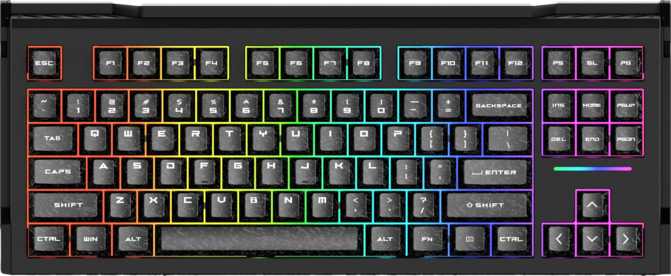
Dareu GT87 Review: A Wireless Hall Effect Keyboard That Punches Up
KeyboardsHall effect keyboards have crossed into the mainstream, and the Dareu GT87 sits at the center of that shift — a wireless tenkeyless mechanical keyboard built on magnetic switch technology that registers keystrokes without physical contact. It ships with adjustable actuation, rapid trigger, dual actuation, analog input, and three connectivity modes. That feature list would have looked ambitious on a flagship product not long ago. The question worth answering is whether Dareu has delivered all of it cohesively, or simply assembled an impressive spec sheet.
Design and Build Quality
Form factor, materials, and physical construction
Form Factor and Dimensions
The GT87 uses a tenkeyless layout — every key you use daily is present while the numeric keypad is removed. That eliminates roughly 20% of the keyboard's footprint compared to a full-size board, freeing desk space that FPS and action game players will immediately put to use for wider mouse movement.
At approximately 378mm wide and 225mm deep, it is compact without feeling cramped. Adjustable rear feet offer two tilt angles to suit different typing positions, and the included wrist rest means a complete setup is possible straight out of the box without hunting for a compatible accessory.
Materials and Finish
The outer shell is plastic, finished in black — the only color available. Plastic cases are standard across most mechanical keyboards at this price point. What matters more is the internal construction: the switch plate uses polycarbonate, a flexible material that absorbs keystroke energy differently than rigid metal alternatives.
Polycarbonate plates flex slightly under keystroke pressure, softening both sound and feel. Combined with the gasket mount system, this produces a cushioned typing experience that contradicts what the plastic exterior might initially suggest.
Gasket Mount — Why It Matters
Most budget and mid-range keyboards attach the internal plate and circuit board directly to the case walls — rigid contact with nothing absorbing impact. Gasket mounting adds a layer of compliant material between the plate assembly and the case, letting the plate float slightly rather than sitting rigidly fixed.
The practical result is a springier, quieter typing experience with less sound and vibration reaching your desk. Keyboards built this way tend to produce a softer, thuddier keystroke sound and reduce fatigue during extended sessions. At this price point, gasket mounting is uncommon — its presence here is a genuine advantage.
Weight Consideration
At 1,450 grams, the GT87 is on the heavier side for a tenkeyless wireless keyboard. A large internal battery contributes substantially to that figure. The upside is desk stability — this board does not shift during intense use. The downside is portability: anyone who regularly moves the keyboard between locations will notice the weight.
For stationary desk setups, the mass is a non-issue and actually works in your favor. For travelers or people who frequently pack and unpack peripherals, it is worth factoring in before purchasing.
The TMR Magnetic Switches
Hall effect technology — how it works and what changes for you
How Hall Effect Switches Work
Traditional mechanical switches register a keypress when two metal contact points physically touch inside the switch housing. The GT87's TMR Magnetic Switches use a different mechanism entirely: a magnet moves past a magnetic field sensor, and the sensor detects exactly how far the magnet has traveled — no physical contact required at any point in the stroke.
The consequences are significant. With no contact surfaces to oxidize or degrade, switch behavior does not change over time. The feel and consistency you experience on day one should remain identical years later. Traditional switches are typically rated for 50 to 100 million actuations before degradation becomes noticeable; hall effect switches outlast that with no measurable change in performance.
Switch Feel and Actuation Force
The TMR switch is linear — force builds smoothly as you press down, with no tactile bump or audible click midway through the stroke. Linear switches are the dominant choice in competitive gaming because the uniform resistance profile supports faster repeated keypresses. At 35 grams of actuation force, these sit at the lighter end of the linear range, reducing finger fatigue during extended sessions. Most users with a moderate typing touch adapt to the weight within a few days.
Switch Specifications
- Type
- Hall Effect Linear
- Switch Name
- TMR Magnetic
- Min. Actuation
- 0.1 mm
- Max. Actuation
- 3.5 mm
- Actuation Force
- 35 g (light)
- Total Travel
- 3.4 mm
- Hot-Swappable
- Yes
- Contact Wear
- None
Adjustable actuation range
The full travel range is configurable through software — set any point within that window as your personal actuation threshold.
Advanced Switch Features
What each competitive capability actually does in real-world practice
Adjustable Actuation
A conventional keyboard fires at a fixed depth — typically around 2mm into the press. The GT87 lets you set that trigger point anywhere from an almost imperceptible brush of the key to a near-full-depth press. At the shallow end, keys fire from nearly no movement; at the deeper end, a more deliberate feel reduces accidental inputs.
Adjustments can be applied globally or configured per-key through the software. You could set movement keys shallower for gaming speed and leave typing keys deeper for comfort — all within the same active profile.
Rapid Trigger
On a standard keyboard, a key must travel back past the actuation point before it can register again — a fixed reset threshold. Rapid trigger removes that fixed reset entirely: the key resets the moment it begins moving upward, regardless of where it currently sits in its travel range.
In competitive first-person shooters, releasing a movement key registers the instant your finger lifts, enabling more precise counter-strafes and faster directional changes. For everyday typing, rapid trigger produces no meaningful change — it only matters at the speed and input patterns that gaming generates.
Dual Actuation
Dual actuation assigns two distinct functions to a single key at two different press depths. A light press triggers one action; a full press triggers another. In a racing simulation, a single key could control acceleration at a shallow press and activate a boost at full depression.
This is an enthusiast-level feature with specific use cases. Players who build configurations around it effectively double their accessible inputs without reaching for additional keys. For general use and typing, it operates transparently — dual actuation only activates when you configure it to do so.
Analog Input
Most keyboards send only a binary signal — a key is either pressed or it is not. Analog input allows the GT87 to communicate a continuous value representing how far a key is currently depressed, enabling variable-speed character movement in compatible games or nuanced throttle control in racing and flight simulators.
Game support for analog keyboard input is still expanding compared to controller support. Having the hardware capability in place now means the GT87 becomes more useful as compatible titles accumulate over time.
Connectivity and Polling Rate
Three ways to connect — and when to use each one
Wired USB
Lowest possible latency with no battery consideration. The detachable cable means you are not locked to the included version — standard replacements are inexpensive and universally available.
Best for zero-latency gaming2.4GHz Wireless
Dedicated radio frequency with near-wired response. Not subject to interference or the latency Bluetooth introduces. Requires a USB receiver but delivers wireless freedom without competitive penalty.
Best for wireless gamingBluetooth
Connects to tablets, secondary computers, or any device without occupying a USB port. Carries more latency than 2.4GHz — adequate for typing and productivity, not recommended for competitive play.
Best for multi-device typingPolling Rate: 1,000Hz
The keyboard communicates with your computer 1,000 times per second — once every millisecond. This is the established standard for gaming keyboards at this tier and is sufficient for all but the most extreme competitive scenarios where 4,000Hz or 8,000Hz polling has recently become available on premium boards. In actual gameplay, the perceptual difference between 1,000Hz and higher rates is negligible for the vast majority of players.
Battery Life
How far it goes between charges — and what affects that figure
~190
hours
Rated battery life (RGB off)
~3–4 weeks at 8 hours/day
RGB lighting intensity is the primary variable affecting runtime. Turning lighting off or keeping it at low brightness is the main lever for maximizing battery life.
The GT87's battery performance is exceptional by wireless keyboard standards — most wireless keyboards in this category deliver 40 to 80 hours under normal conditions. The trade-off is a larger internal battery that contributes to the keyboard's above-average weight. For most users, that is a straightforward win: charging once a month rather than once a week is a meaningful quality-of-life improvement that compounds over the life of ownership.
Keycaps
Material quality, construction standard, and long-term durability
PBT Double-Shot Construction
The included keycaps are made from PBT plastic — a harder, more wear-resistant material than the ABS plastic found on most budget keyboards. ABS develops a polished, shiny appearance on frequently pressed keys after months of daily use. PBT does not: the texture and matte finish stay consistent from day one through years of heavy use.
Double-shot construction means the legends — the characters printed on each key — are formed from a separate inner layer of plastic molded inside the keycap during manufacturing, not printed onto the surface afterward. A printed legend can wear away over time. A double-shot legend is structurally part of the keycap and cannot fade, regardless of how many hours the board accumulates. This is the same standard used on premium aftermarket keycap sets.
OEM Profile and Standard Layout
The keycaps use OEM profile — taller and more sculpted than the Cherry profile popular in enthusiast circles, but immediately familiar to anyone who has used a standard keyboard. The vast majority of users will find it comfortable from the first session. Enthusiasts who prefer a flatter, lower-profile typing experience should note this before purchasing.
The keyboard uses a standard ANSI layout with a standard bottom row. This matters for long-term ownership: aftermarket keycap sets fit without compatibility concerns. You are not locked into proprietary sizing, and the pool of compatible replacement sets is as wide as it gets in the hobby.
Other Features Worth Knowing
Practical capabilities that complete the overall package
-
Hot-Swappable Switches
Switches can be removed and replaced without soldering. A failed switch is replaced individually rather than requiring a full keyboard replacement. If you decide you want a different switch feel later, you can swap the entire set without any technical skill. Note that hall effect hot-swap sockets may not accept all traditional mechanical switch types — verify compatibility before purchasing replacements.
-
USB Passthrough Port
A passthrough port lets you connect a mouse, USB drive, or other peripheral directly into the keyboard rather than reaching for a port on the back of a computer tower. A practical desk convenience for setups where the computer is out of easy reach.
-
N-Key Rollover (NKRO)
Every key pressed simultaneously is registered with no limit. Standard keyboards can drop inputs when too many keys are pressed at once — a problem called ghosting. NKRO eliminates this entirely. In gaming, it is a reliability feature. In typing, it is never an issue regardless of speed.
-
Per-Key RGB Backlighting
Per-key RGB is present and configurable through Dareu's software. Lighting profiles can be adjusted for aesthetics or brightness. Running heavy RGB at full brightness comes at a direct cost to wireless battery life — the relationship between lighting intensity and runtime is linear and significant.
-
No QMK or VIA Support
The GT87 does not support QMK or VIA — the open-source firmware platforms used by enthusiasts for deep key remapping, macro creation, and cross-platform configuration. All customization runs through Dareu's proprietary software. This is functional for the intended user base but represents a firm boundary for anyone who relies on open firmware ecosystems.
Who Should Buy the Dareu GT87
Matching the right buyer to the right board
Good Fit For
- Competitive FPS and action game players who want rapid trigger and adjustable actuation without paying flagship prices
- Gamers who want genuine wireless performance — not wireless as a compromise over wired
- Users upgrading from a membrane or entry-level mechanical keyboard who want to experience hall effect technology for the first time
- Desk setups where space is limited and tenkeyless provides needed room for wider mouse movement
- Buyers who want durable PBT double-shot keycaps included rather than upgrading them separately at additional cost
Not a Good Fit For
- Mac users — not designed for macOS key layouts, and Dareu's configuration software is Windows-focused
- Firmware enthusiasts who depend on QMK or VIA for deep open-source customization and cross-platform control
- Users who want a 60% or 65% compact layout — the GT87 is tenkeyless and offers no smaller option
- People who need maximum wireless battery life while running heavy RGB — full brightness substantially reduces runtime
- Buyers who require a color option other than black — the GT87 ships in one finish only
Competitive Positioning
How the GT87 stacks up against logical alternatives at the same price tier
| Feature | Dareu GT87 | Traditional Mech (Same Price) |
Budget Hall Effect (Alternative) |
|---|---|---|---|
| Switch Technology | Hall Effect — no wear | Contact-based | Hall Effect |
| Adjustable Actuation | Often yes | ||
| Rapid Trigger | Rarely |
Often yes | |
| Dual Actuation | Rarely |
||
| Wireless Modes | USB + 2.4GHz + BT | Often wired only | Varies |
| Battery Life | ~190 hours | N/A or 40–80 hrs | Typically less |
| Gasket Mount | Rarely at this price |
Varies | |
| Hot-Swap Support | Inconsistent | Usually yes |
|
| Keycap Quality | PBT Double-Shot | Often ABS printed | Varies |
| QMK / VIA Support | Sometimes | Rarely |
|
| Included Wrist Rest |
The GT87 concedes ground on open firmware support and software ecosystem maturity. Brands with longer histories in the hall effect space have more refined software and larger support communities. Dareu's software is functional for its target user but the gap is real for advanced users.
Honest Assessment
Where the GT87 earns its place — and where it genuinely falls short
Where It Delivers
The combination of a gasket-mounted polycarbonate plate at this price point, delivered with hall effect switches, is genuinely good value. The typing experience absorbs keystroke energy and returns a softer, more cushioned response than a rigid metal-plate keyboard — that quality used to cost significantly more to access.
Battery performance, if achieved anywhere near the rated maximum with RGB reduced, places the GT87 in a different class from most wireless keyboards. Charging once a month rather than once a week is a real-world convenience improvement that compounds over the life of ownership.
Rapid trigger and adjustable actuation are not marketing features in a competitive gaming context. They produce measurable differences in how the keyboard responds during play, and the GT87 delivers them at a price where they were not previously accessible to most buyers.
Where It Falls Short
The plastic case does not feel premium in the hand, even if the internal construction is better than the shell suggests. Users who care about how the keyboard feels physically — its surface quality, the sound it produces unamplified on a hard desk — may want to pair it with a desk mat and calibrate expectations before purchasing.
The absence of QMK and VIA support is a firm line. If you depend on open firmware for remapping, macros, or cross-platform configuration, the GT87 is not an option regardless of its other strengths.
A one-year warranty is short for a keyboard positioned as a long-term investment in hall effect technology. Competing products sometimes offer longer coverage. Black is also the only finish available — a constraint that will matter to some buyers more than others.
Common Pre-Purchase Questions
Answers to what real buyers search for before committing
Final Verdict
The bottom line before you decide
The limitations are real: no QMK or VIA support closes the door on open customization, the plastic shell will not impress in the hand, and the one-year warranty is modest for a keyboard being positioned as a long-term purchase. These are trade-offs, not dealbreakers, for the intended buyer.
For competitive gamers who want the performance advantages of hall effect switch technology without a flagship price — and who want a keyboard that works reliably at the desk or on the go — the GT87 delivers meaningfully on its promises. For Mac users or open-firmware enthusiasts, the search should continue elsewhere.
If you are a Windows gamer who wants rapid trigger, wireless freedom, and long battery life in a tenkeyless layout, the Dareu GT87 earns a confident recommendation.