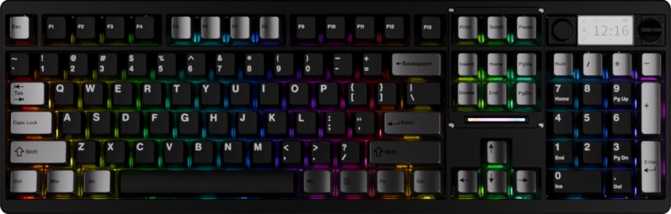
Chilkey ND104 Hands-On Review: Quiet, Wireless, and Built to Stay
KeyboardsChilkey ND104 at a Glance
Six key highlights before the full breakdown
Build Quality and First Impressions
The ND104's physical presence makes itself known immediately. At just over 2.2 kilograms, this is one of the heavier keyboards in the full-size wireless category — noticeably denser than the hollow-feeling boards that dominate budget shelves. That mass comes from the construction: a rigid aluminum top frame paired with a plastic base. The aluminum provides structural integrity and premium hand-feel; the plastic keeps overall cost from climbing unnecessarily. Together they produce a board that does not creak, does not flex under hard typing, and does not shuffle around the desk mid-session.
The footprint is standard for a 100% keyboard — wide enough for every key from Escape to the numpad's Enter, deep enough to feel substantial without crowding the desk. Adjustable rear feet let you dial in the typing angle to your preference, from a near-flat resting position to a more pronounced tilt. The adjustment clicks between positions cleanly rather than relying on friction that degrades over time.
Four colorways are available: white, black, pink, and blue. Each represents a distinct aesthetic direction rather than superficial variations on the same tone — matte black for all-business setups, white and pink for lighter desk aesthetics, and blue for something with more visual personality.
A wrist rest is not included. Given the keyboard's height profile, longer typing sessions benefit from a dedicated wrist rest purchased separately — factor this into your total budget.
Typing Feel: The WS Silent Linear Switch
What a Linear Switch Actually Feels Like
A linear switch completes its keystroke in one unbroken motion — smooth from the moment your finger contacts the key to the moment it bottoms out, with no tactile bump or audible click breaking up the travel. The resistance is consistent throughout. If you have only ever typed on membrane keyboards, think of it this way: the mushy, unpredictable give of membrane is replaced by something precise and controlled, without the dramatic clacking that many people associate with mechanical boards.
The "Silent" Difference
The ND104 ships with WS Silent Linear switches, and the "silent" component is not marketing language — it is a structural modification. These switches contain noise-dampening material at both the bottom of the downstroke and the return point of the upstroke. The result is a typing sound that trends toward a soft, contained thud rather than the sharp mechanical crack of a standard switch. In a shared office or a room where someone is sleeping nearby, the difference is real and immediately noticeable.
The Numbers Behind the Feel
The actuation point sits at exactly 2mm of travel, with the full keystroke completing at 3.5mm. The required force is 45 grams — medium-light, accessible to touch typists and comfortable for extended sessions, but weighted enough that accidental keypresses from resting fingers are not a concern.
Hot-Swap: Change Your Mind Later
Every switch on the ND104 sits in a hot-swap socket, meaning it can be removed and replaced without soldering equipment or technical knowledge. A small switch-puller tool lets you extract any switch in seconds and press a replacement in. If you try the silent linears and want something with more resistance, a tactile bump, or a different travel feel, you can retrofit the entire board in an afternoon. Hot-swap support transforms what would otherwise be a permanent hardware decision into a reversible one.
The Sound Signature: FR4 Plate and Acoustic Character
Inside the case, between the PCB and the keycaps, sits an FR4 mounting plate — the same fibreglass composite material used in circuit boards. FR4 occupies a middle position in the spectrum of plate materials: stiffer than polycarbonate, which produces a softer and more flexible typing feel, but less rigid and less prone to high-pitched resonance than aluminum or brass. The acoustic character of FR4 trends toward a tighter, well-defined sound — controlled rather than hollow, with a satisfying firmness to each keystroke that does not feel metallic.
Combined with the silent switch dampeners and the density of the aluminum-reinforced case, the ND104's overall acoustic profile is quiet and grounded.
The typing sound sits somewhere between an office-grade membrane and a standard open-air mechanical keyboard — mechanical in feel, contained in sound. The kind of profile you can sustain through a video call without muting yourself.
Three Ways to Connect: Flexibility Without Compromise
Bluetooth 5.3
Lower latency and improved connection stability over older Bluetooth versions. Handles crowded wireless environments — home offices with multiple devices, open-plan workspaces — more gracefully. Supports multi-device pairing so you can switch between a laptop, desktop, or tablet without pulling cables or dongles.
Best for multi-device workflows, laptops, tablets
2.4GHz Wireless
Via USB dongle — the closest wireless equivalent to a physical cable. At a 1,000Hz polling rate, any keypress is registered within a single millisecond. For gaming sessions where Bluetooth's slightly higher latency is perceptible, 2.4GHz is the right mode to use.
Best for gaming, desktop setups, precision work
Wired USB
Uses a detachable cable, eliminating the fraying and connector wear that fixed cables develop over time. Swap in different cable lengths or styles at any time. Works as a charging method — keeping the keyboard fully operational while the battery refills with zero forced downtime.
Best for charging, maximum reliability, shared PCs
Battery Life That Earns the "Wireless" Label
The internal battery supports approximately 118 hours of wireless use. In practical terms: typing for 8 hours every working day means reaching for the charging cable roughly once every two to three weeks. For less intensive daily users — a few hours of light work, some evening browsing — a single charge could stretch across a full month.
This is well above average for wireless mechanical keyboards, many of which push users toward a weekly charging ritual. The extended runtime means the charging cable comes out occasionally rather than routinely — wireless use that largely disappears as a daily maintenance concern.
A Complete Workspace Layout: Numpad, Rotary Dial, and Media Controls
The ND104 uses a full 100% layout, which means the numeric keypad, function row, navigation cluster, and arrow keys are all present as dedicated keys — no function-layer shortcuts required for number entry or delete. For users whose work involves spreadsheets, accounting software, data entry, or any workflow requiring frequent number input, the numpad is not a luxury — it is a tool this keyboard delivers without compromise.
Full Numpad
Dedicated number entry — faster and more accurate than the number row for intensive data work or spreadsheet navigation
Rotary Dial
Physical encoder for volume, scrolling, and assignable functions — quicker than reaching for software controls mid-call or mid-session
Dedicated Media Keys
Play, pause, skip, and stop on independent physical keys — not shared functions requiring a function-layer hold
Onboard Display
Built-in status screen confirms active connection mode and keyboard state at a glance — no guesswork about your current wireless channel
The onboard display is a feature typically reserved for more expensive enthusiast boards. Its presence here removes a recurring source of minor daily friction — confirming whether the board is on Bluetooth or 2.4GHz takes a glance rather than a key-combination test.
Customization: VIA, N-Key Rollover, and RGB Backlighting
VIA Keyboard Configuration
The ND104 supports VIA, a widely used keyboard configuration tool that lets you remap any key, create macros, and adjust lighting profiles through a graphical interface — no programming knowledge required. Open a browser or the VIA application, connect the keyboard, and you are remapping keys visually within minutes.
Understanding the scope of this support requires brief context. VIA compatibility here operates without the underlying QMK open-source firmware that enthusiasts often build their workflows around. The practical implication: VIA's full graphical remapping and macro capabilities are available, but the advanced scripting features that QMK enables — including complex tap-dance macros, combo inputs, and conditional layer logic — are not. For the large majority of users, VIA provides everything they will ever need. Only those who specifically program custom firmware at the code level will encounter this boundary.
QMK and ZMK firmware are not supported. VIA is the customization ceiling on this board. For most users — remapping keys, building macros, adjusting per-key lighting — this is more than sufficient.
N-Key Rollover
The keyboard registers every simultaneous keypress independently, regardless of how many keys are held at once. In practical terms: no missed keypresses during fast typing sequences or complex gaming key combinations. Many keyboards — particularly older or budget designs — drop keypresses when several keys are pressed together, a problem called ghosting. Full N-key rollover eliminates this entirely.
RGB Backlighting and South-Facing LEDs
The full per-key RGB system uses south-facing LEDs, positioned to shine light upward through the legends of the double-shot PBT keycaps. Since the keycap body is solid and opaque, light emerges cleanly through the character cutouts rather than bleeding through the material. South-facing LEDs are compatible with the widest range of aftermarket keycap profiles — including Cherry-profile sets — without the fitment issues north-facing boards can introduce. Lighting is fully controllable through VIA, including per-key color, brightness, animation patterns, and complete power-off to extend wireless battery life.
The Keycaps: Built to Last
The included keycaps are double-shot PBT — two separate layers of plastic bonded together so the legends are physically part of the keycap structure, not printed or painted on top. They cannot fade, wear through, or rub off regardless of how many hours are typed on them.
Double-Shot PBT Material
PBT plastic resists the surface shininess that develops on cheaper ABS keycaps over extended use. The key surface maintains a consistent, matte texture rather than developing a greasy, reflective sheen on the most-used keys over time.
OEM Profile
Slightly taller than the Cherry profile standard, with a gentle forward tilt on upper rows. Familiar to anyone coming from standard office keyboards and accessible for first-time mechanical keyboard users.
Standard ANSI Layout
Every key uses a conventional size. Any standard ANSI keycap set — and thousands are available from third-party vendors — fits without gaps, misalignments, or missing spacers.
Who This Keyboard Is Built For — and Who Should Look Elsewhere
Well Suited For
- Office workers and home-office users who need a full numpad, want wireless freedom, and need the discretion of silent switches in shared or noise-sensitive spaces
- Multi-device users who switch between a desktop, laptop, or tablet — three connection modes handle this without cable swapping, and Bluetooth multi-pairing simplifies daily transitions
- Typists stepping up from membrane who want mechanical precision and durability without committing to a loud, click-heavy sound profile
- Customization-minded buyers — hot-swap switches and VIA support let you adapt the board to your preferences without purchasing a new keyboard
- Low-maintenance wireless users who dislike weekly charging — the extended battery runtime means the cable comes out occasionally, not habitually
Poor Fit For
- Competitive gamers seeking hall-effect switch features such as rapid trigger, adjustable actuation, or analog input — the ND104 is not engineered for tournament-level switch optimization
- Mac users — the board is designed for Windows. Key labeling, modifier positions, and function behaviors are mapped to Windows conventions and will require workarounds on macOS
- Anyone who carries their keyboard between locations regularly — at over 2.2 kilograms, this is a permanent desk fixture, not a travel companion. The weight will be noticed on every move
- Advanced firmware developers who need full QMK or ZMK support to program complex keymaps at the code level — VIA is the hard customization ceiling on this board
How the ND104 Compares to the Alternatives
| Feature | Chilkey ND104 | Typical Full-Size Wireless | Gasket-Mount Alternative |
|---|---|---|---|
| Layout | Full 100% with numpad | Full or TKL | Rarely full — TKL or 75% |
| Silent switches | Yes, included | Uncommon | Optional upgrade |
| Connection modes | 3 (BT, 2.4GHz, USB) | Usually 2 or 3 | Usually 2 |
| Battery runtime | ~118 hours | 50–80 hours typical | 20–100 hours, varies |
| Hot-swap | Yes | Varies by model | Often yes |
| VIA support | Yes | Varies | Often yes |
| Onboard display | Yes | Rare at this tier | Rare |
| Rotary dial | Yes | Uncommon | Uncommon |
| QMK support | No | Varies | Often yes |
| Mounting style | Plate mount (FR4) | Plate mount | Gasket mount |
| Weight | ~2.2 kg | 1.0–1.8 kg typical | 1.5–2.2 kg typical |
Comparisons reflect general category averages. Individual models vary significantly within each category.
Honest Assessment: Where It Earns Praise and Where It Falls Short
Genuine Strengths
The silent linear switches are a considered choice for a board targeting everyday professional use — they make the step from membrane to mechanical accessible for noise-sensitive environments without sacrificing the mechanical feel.
The battery runtime is exceptional and reduces the wireless charging fatigue that plagues shorter-endurance competitors. This changes the charging cycle from weekly to once or twice a month — a meaningful shift in daily routine.
Triple connectivity and the onboard display are practical daily conveniences that competitors frequently omit at this price point. They earn their place through repetition of use, not novelty.
The hot-swap socket and VIA support give the keyboard a longevity that spec-to-price comparisons do not fully capture — the board grows with you rather than locking you into its shipping configuration.
Honest Shortcomings
Over 2.2 kilograms demands honesty. For a keyboard that lives permanently on one desk, the weight is a non-issue and beneficial for stability. For anyone who moves their keyboard between spaces, that mass will be noticed repeatedly.
The absence of QMK and ZMK is a real gap for customization enthusiasts. VIA covers remapping and macros, but deeper scripting possible through QMK is off the table. If those terms are unfamiliar, you will never miss what is not there.
No wrist rest in the box is a minor inconvenience but not a meaningful objection at this price tier. Budget for one separately if ergonomics are a priority.
The Mac exclusion is a hard stop for Apple users. The keyboard will connect to macOS in a basic capacity, but key labeling and function behaviors make it a Windows-and-Linux board without qualification.
Common Questions Before You Buy
Final Verdict
The Chilkey ND104 is a well-considered full-size wireless mechanical keyboard for users who have been waiting for this specific combination of features to arrive in one package. Silent switches, genuine wireless versatility across three connection modes, exceptional battery runtime, a complete 100% layout, a physical rotary dial, dedicated media controls, and an onboard status display — assembled together, they constitute a board that handles everyday professional and home-office use without asking for compromise on the features that matter most.
It does not target competitive gaming enthusiasts requiring hall-effect switch technology, and it does not serve Mac users. Its weight commits it to life on a single desk. Its firmware sits below the QMK ceiling that some enthusiasts require. None of these are hidden limitations — they define the product's honest scope.
The ND104 makes most sense if you check most of these boxes:
- Windows user with a permanent single-desk setup
- Need a numpad for data entry, spreadsheets, or accounting work
- Work in a shared, open, or otherwise noise-sensitive environment
- Regularly connect to multiple devices throughout the day
- Prefer low-maintenance wireless use over frequent charging
- Value the ability to swap switches and remap keys as preferences evolve