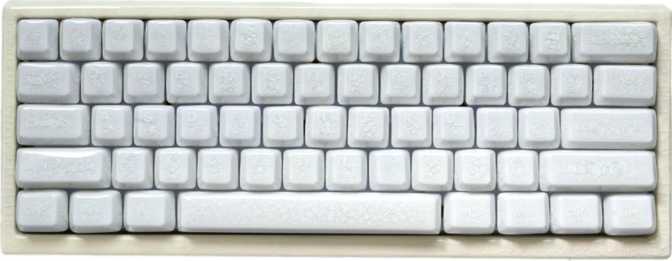
Cerakey Peak60 Full Review: Hall Effect Meets Full-Size
KeyboardsMost full-size mechanical keyboards ask you to choose between premium typing feel and competitive performance features. The Cerakey Peak60 refuses that trade-off. It pairs hall effect switch technology — the same magnetic sensing system quietly reshaping competitive gaming peripherals — with a full 100% layout, gasket mounting, and PBT keycaps in a package that works as naturally on a minimalist home office desk as it does at a dedicated gaming station. Understanding exactly what you are getting before you commit matters, and this review covers every angle.
Build Quality and Physical Presence
The Peak60 is a substantial keyboard. At 760 grams, it has the kind of weight that signals quality the moment you pick it up — it does not flex, slide, or rattle under enthusiastic typing. The gasket mount construction is largely responsible for this. Rather than the top plate and PCB being rigidly screwed into the case, the internal assembly floats on a ring of silicone or foam gaskets that absorbs vibration and gives every keystroke a softer, more cushioned rebound. Typists who have only used plate-mounted boards will notice the difference immediately — and almost universally prefer it.
The case comes in three options — White, Pink, and Blue — clean, modern choices that move away from the all-black aesthetic dominating the category for years. The Pink and White colorways suit minimalist desk setups without looking out of place in a gaming context. Adjustable tilt feet give you control over typing angle, which matters more than most people anticipate during long work sessions.
The cable cannot be swapped out for a coiled cable or a different length. For a keyboard at this specification level, a removable USB-C connection would have been expected. It does not affect daily use but limits customization options and makes transport less convenient.
No wrist rest is included. Given the standard profile height, users who type for extended periods will want to source one separately — a common omission at this tier, but worth factoring into your total cost.
- Width309.6 mm
- Depth118.1 mm
- Height34.48 mm
- Weight760 g
- ColorsWhite, Pink, Blue
- Adjustable TiltYes
- Wrist RestNot included
- Detachable CableNo
- Warranty1 Year
The Technology Inside: Hall Effect Switches Explained
The Gateron Jade Max HE switches are the heart of what makes the Peak60 technically interesting, and they deserve a proper explanation rather than a bullet point.
Traditional Mechanical
Works through physical metal contact — two conductors touch when a key is pressed, completing a circuit. The actuation point is fixed in hardware and cannot be changed by the user.
The contact pads wear from repeated striking over millions of keypresses, gradually degrading the consistency and feel of each switch over its lifetime.
Hall Effect (Peak60)
A small magnet sits inside each switch. As the key travels, the magnet shifts position relative to a sensor on the circuit board, which reads that position continuously. No metal contacts are involved in the sensing process at all.
The board knows exactly how far each key has traveled at any given moment — down to fractions of a millimeter — with no mechanical wear affecting accuracy over time.
Switch Feel and Actuation Force
The Jade Max HE is a linear switch — no tactile bump, no audible click, just smooth and consistent resistance through the full travel. The actuation force sits at 36 grams, which is on the lighter end of the linear spectrum. Most users adapt within a few days, but typists with heavier hands may find the sensitivity requires some adjustment initially. The total travel distance of 3.5mm is standard for linear switches, meaning the key bottoms out at the same depth as most conventional alternatives.
Hot-swap sockets let you replace every switch without soldering — just a switch puller and compatible hall effect replacements. If the 36g linear action turns out too light for your workflow, you have a clear path to something different without buying a new board.
Performance Features: What the Specs Mean in Practice
The Peak60's feature set is unusually dense for a full-size keyboard. Each capability listed below requires software configuration to reach its full potential — out of the box, the board performs as a standard full-size keyboard with sensible defaults.
Adjustable Actuation
The actuation point — the depth at which a keypress registers — can be set anywhere from just 0.1mm to the full 3.5mm of travel, adjusted per-key in software. At 0.1mm, the key barely moves before firing. At 3.5mm, it must be pressed completely through. This flexibility alone separates the Peak60 from every conventional mechanical keyboard in its price range.
Rapid Trigger
On a conventional keyboard, a key must travel back above its fixed actuation point before registering a second press. With Rapid Trigger, the Peak60 tracks position continuously — the moment a key reverses direction, even fractionally, the input resets. Counter-strafing, repeated key inputs, and direction changes register faster and more reliably than any traditional switch can achieve.
8,000 Hz Polling Rate
Standard keyboards report their state to the computer 1,000 times per second. The Peak60 reports 8,000 times per second. Combined with Rapid Trigger, this creates a system where inputs are captured and transmitted with minimum latency at every stage. This matters specifically to competitive players — for everyday work and casual gaming, 1,000 Hz is already beyond what is perceptible.
Dual Actuation
A single key can be assigned two different functions depending on press depth — a light press triggers one action, pressing through fully triggers another. This is currently niche but has genuine applications in specific game genres and macro-heavy workflows. Software configuration is required to make effective use of this feature.
Analog Input
Related to dual actuation, analog input means the keyboard can communicate degrees of keypress — not just pressed or not — to supported software. Mainstream game support remains limited, but the capability is embedded in the hardware and may gain broader adoption as hall effect technology becomes more widely used across peripherals.
Full N-Key Rollover
Every key on the board can be pressed simultaneously and registered correctly. For fast typists this means no missed characters when multiple fingers land at once. For gaming it eliminates ghosting — the issue where certain key combinations fail to register on lower-end hardware because the controller cannot track them all concurrently.
Keycaps: A Better-Than-Expected Standard
PBT double-shot keycaps in Cherry profile is a strong specification at this price tier, and it shows in daily use.
PBT plastic is denser and harder than the ABS plastic found on most budget and mid-range keyboards. It resists the shine that develops on high-use keys over time — that worn, slightly greasy look on movement keys that appears on cheaper boards after six months. PBT also produces a slightly higher-pitched, crisper sound on impact that many typists prefer over the duller thud of ABS.
Double-shot construction means the legends — the characters on each keycap — are formed from two separate layers of plastic molded together, not printed on, painted, or laser-etched. They will not fade regardless of how heavily the board is used.
Cherry profile is a medium-height, slightly sculpted shape with decades of history behind it. It suits touch typists, is compatible with a wide range of aftermarket keycap sets, and is universally readable. The standard ANSI layout means replacements and upgrade sets are easy to source.
The RGB diode sits at the bottom of each switch rather than the top. This eliminates a compatibility issue common in north-facing LED setups, where certain keycap designs interfere with the LED and produce uneven glow. If you plan to install a custom keycap set later, south-facing LEDs give you a significantly broader range of compatible options.
- MaterialPBT Plastic
- ConstructionDouble-shot
- ProfileCherry
- LayoutANSI (US)
- LED DirectionSouth-facing
- Legend FadeWill not fade
- Aftermarket SetsCompatible
Who This Keyboard Is Built For — and Who Should Look Elsewhere
Most hall effect keyboards with rapid trigger have launched as compact 60% or tenkeyless layouts. A full 100% layout with this feature set is uncommon. If you need a numpad for non-gaming tasks and do not want to maintain a second keyboard, this is one of very few options in this category.
The gasket mount, PBT keycaps, and linear hall effect switches combine to deliver a typing experience that is noticeably better than anything at the entry level. The improvement is immediate and requires no adjustment period.
Hot-swap sockets mean you can replace every switch without soldering. If the 36g linear feel does not suit your workflow after a few weeks, the board accommodates compatible hall effect alternatives without requiring a complete new purchase.
The Peak60 is wired only — no Bluetooth, no 2.4 GHz receiver, no battery. If a cable-free desk or multi-device switching is a priority, this board has no answer for that requirement.
The keyboard is not designed for macOS — no dedicated Mac layout, no Command key labeling. It functions with software remapping, but the legends will not match macOS conventions, which creates daily friction.
The Jade Max HE is purely linear. If you have tried linears before and found them unsatisfying — if you rely on a tactile bump to confirm each keypress — this board's default switch is not built for that preference.
How It Compares to the Alternatives
The Peak60's clearest competitive advantage is the full 100% layout — most hall effect competition has prioritized compact form factors. A tenkeyless hall effect board at a similar price may offer comparable performance in a smaller footprint, but you permanently lose the numpad. Against traditional mechanical keyboards at the same price, the Peak60 wins on input technology: no conventional switch can match adjustable actuation or genuine rapid trigger.
| Feature | Cerakey Peak60 | Typical TKL Hall Effect | Full-Size Traditional Mech |
|---|---|---|---|
| Layout | Full 100% | Tenkeyless (87-key) | Full 100% |
| Switch Technology | Hall Effect | Hall Effect | Traditional Mechanical |
| Rapid Trigger | Yes | Yes (most models) | No |
| Adjustable Actuation | 0.1 – 3.5 mm | ~0.2 – 4.0 mm (varies) | Fixed only |
| Gasket Mount | Yes | Varies by model | Rarely |
| Polling Rate | 8,000 Hz | 1,000 – 8,000 Hz | 1,000 Hz |
| Wireless Option | No | Rarely available | Sometimes available |
| PBT Keycaps | Yes | Varies by model | Varies by model |
Strengths and Honest Weaknesses
The Peak60's strengths are concentrated in its technical foundation. The combination of hall effect switches, gasket mounting, and quality PBT keycaps in a full-size package is genuinely uncommon. The 8,000 Hz polling rate and rapid trigger implementation place it alongside peripherals used by serious competitive players. The three color options make it one of the more aesthetically flexible options in a category that often defaults to aggressive all-black styling.
The hot-swap sockets compound this: you are not locked into the Jade Max HE feel. If the 36g linear action is too light for your preference, compatible hall effect alternatives can replace the entire set without any technical expertise beyond basic disassembly.
The south-facing LED setup may produce a slightly different visual effect compared to north-facing designs — neither is objectively superior — but the south-facing arrangement carries a practical advantage in aftermarket keycap compatibility that offsets any visual trade-off.
Key Weaknesses
The most frustrating omission at this specification level. No coiled cable upgrade, limited cable routing flexibility, and less convenient transport compared to any detachable-cable competitor.
Shorter than many competitors offering two to three years. Provides less long-term confidence for what is a premium purchase.
A soft criticism — most users buy these separately anyway — but it adds real cost, especially for heavy typists who need one.
A fundamental limitation for users who prioritize a clean desk or need to switch between multiple devices without a wired connection.
Common Questions Before Buying
These are the questions real buyers search for before committing to a keyboard at this specification level.
Final Verdict
RecommendedThe Cerakey Peak60 makes a specific and well-executed argument: competitive gaming keyboard technology and full-size practicality can coexist in the same chassis. It largely succeeds. The Gateron Jade Max HE hall effect switches, genuine gasket mounting, quality PBT keycaps, and 8,000 Hz polling rate represent a technical specification that would have been considered exotic in a full-size keyboard until recently.
The non-detachable cable and one-year warranty are legitimate reasons to hesitate, and wireless users are simply not in this keyboard's audience.
If you play competitive games that reward input speed and precision, work at a desk that demands a numpad, and type enough to care about keycap feel and acoustic quality — the Cerakey Peak60 is one of very few keyboards that genuinely serves all three without compromise. For that specific buyer, it earns a clear recommendation.