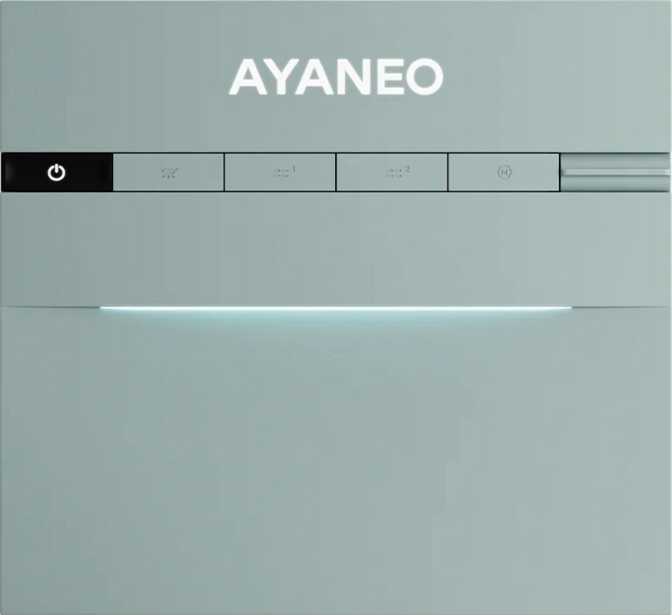
Ayaneo AM03 Review: Full-Power Mini PC for Serious Users
Mini PCsWhat the Ayaneo AM03 Actually Is — And Why That Matters
The compact desktop market is crowded with machines that promise full PC power in a small box, then quietly disappoint once they leave the product page. The Ayaneo AM03 takes a different approach: it pulls a high-wattage laptop-class processor out of a notebook chassis, gives it a proper thermal environment, surrounds it with enthusiast-grade memory and fast storage, and packages all of it in a form factor that sits comfortably on a desk without dominating it.
The result is a mini PC that straddles the line between everyday productivity workhorse and capable light creative workstation — without requiring a discrete graphics card, a full tower, or a premium gaming budget. Whether that balance works for you depends entirely on what you're asking it to do, and that's exactly what this review addresses.
Design and Build: Compact Without Compromise
The AM03 follows the Micro-ATX form factor convention — which, in mini PC terms, means this is a proper small-footprint desktop, not a palm-sized cube or a stick computer. The chassis has enough internal volume to accommodate meaningful cooling for a 45-watt processor, which is a non-trivial engineering requirement that many competing mini PCs sidestep by throttling their chips to lower power targets.
What you get physically is a machine that can live under a monitor, beside a TV, or in a media cabinet without demanding its own real estate. It's not invisible, but it's unobtrusive. Ayaneo's industrial design language emphasizes clean lines — this doesn't look like a server offcut or a budget white-box unit.
Because the AM03 runs its processor at a full 45 watts, it requires active cooling. This is not a passively cooled or silent-by-design system. Fan noise increases under sustained load — something to factor in if near-silent operation is a priority.
The Processor: Laptop Chip, Desktop Ambitions
The AM03 is built around a processor designed for high-performance laptops — a 14-core, 20-thread chip with six performance cores running at up to 2.5 GHz base and eight efficiency cores handling lighter workloads at 1.8 GHz. The turbo ceiling reaches 5 GHz on the performance cores, which is competitive for sustained single-core tasks like browser responsiveness, spreadsheet calculations, and lightly-threaded application logic.
This hybrid core design is important to understand. The efficiency cores handle background tasks, system services, and parallel workloads, freeing the performance cores to focus on whatever demands immediate attention. In practice, this means the AM03 can juggle a video conference, a browser with thirty tabs, a document editor, and background cloud sync without the fan spinning up to full speed.
The 45-watt thermal envelope is the defining advantage. Most mini PCs in this category run processors at 15–28 watts to keep thermals manageable in tight enclosures. At 45 watts, the AM03 unlocks substantially more sustained performance — particularly in multi-core workloads where lower-wattage machines visibly throttle after the first few seconds of load.
Benchmark Performance
The AM03's benchmark numbers tell a consistent story: sustained performance that reaches mainstream desktop territory, with the 45-watt advantage most visible in multi-core scores where throttled competitors fall 30–40% behind.
Progress bars represent relative performance within the mini PC category, not absolute maximums. Scores are from standardized CPU benchmarking suites.
Memory: The Specification That Separates It From the Pack
Sixty-four gigabytes of DDR5 RAM running at up to 5,200 MHz is the specification that, more than any other, defines who this machine is for. Most mini PCs ship with 16 GB, and 32 GB is considered generous. Sixty-four gigabytes in a compact Micro-ATX mini PC form factor is a statement.
- Virtualization users can run two or three guest operating systems simultaneously without the host machine slowing to a crawl.
- Software developers working with large codebases, containerized environments, or memory-hungry build systems won't hit the ceiling.
- Content creators handling large Photoshop documents, DaVinci Resolve timelines, or multi-track audio sessions have genuine breathing room.
- Power users who keep dozens of browser tabs, multiple productivity apps, and communication tools open simultaneously will never feel constrained.
The DDR5 standard also benefits the integrated graphics directly. Because the Intel Iris Xe GPU shares system memory rather than having its own dedicated VRAM pool, faster RAM translates into tangible graphics performance gains — faster texture loading, smoother frame delivery in GPU-accelerated tasks, and better performance in light gaming or video processing.
The dual-channel memory configuration doubles the bandwidth available to both the CPU and the integrated GPU compared to a single-channel setup, which some competing mini PCs use to cut costs.
Integrated Graphics: Intel Iris Xe 96EU — Honest Assessment
The GPU in the AM03 is Intel's Iris Xe integrated graphics, configured with 96 execution units and a boost clock of 1,450 MHz. This is not a discrete graphics card, and it should not be compared to one. What it is: one of the more capable integrated graphics solutions available in this processor generation, accelerated by the fast DDR5 dual-channel memory described above. The 768 shading units, 48 texture mapping units, and 24 render output units represent a complete and balanced integrated GPU pipeline. DirectX 12 and OpenGL 4.6 support ensure modern software compatibility is not a concern.
- 4K video playback including HDR with hardware decoding
- Light photo editing and color grading in Lightroom
- GPU-accelerated tasks in Premiere Pro and DaVinci Resolve
- Casual gaming at 1080p in older or less demanding titles
- Up to four simultaneous display outputs
- Modern AAA gaming at acceptable frame rates
- 3D rendering workloads that require dedicated VRAM
- Machine learning inference or training at any practical scale
- Competitive multiplayer gaming where frame rate is critical
Storage: 1TB NVMe — Daily Driver Ready
The AM03 ships with one terabyte of NVMe solid-state storage connected via PCIe 4.0 — the upper tier of what consumer SSD technology currently delivers. Sequential read and write speeds on a PCIe 4.0 NVMe drive typically range between 5,000 and 7,000 MB/s, compared to roughly 550 MB/s on a traditional SATA SSD. In practical terms: the operating system boots in seconds, application launches feel immediate, and large file transfers finish before you've had time to think about them.
One terabyte is enough for most primary-use scenarios — a full operating system installation, a professional software suite, a working project library, and media files — without requiring immediate expansion. Users with large media archives or extensive local game libraries will want to connect external storage, which the port selection accommodates comfortably.
Connectivity: A Port Selection That Respects Your Workflow
This is an area where the AM03 makes deliberate choices that distinguish it from budget mini PCs. The port layout reflects careful consideration of daily professional workflows.
| Port / Interface | Specification | Real-World Meaning |
|---|---|---|
| Ethernet | 2x RJ45 | Dual-network connectivity without adapters; ideal for home servers or routers |
| HDMI | HDMI 2.1 (1 port) | Supports 4K at 120Hz or 8K at 60Hz — current gold standard |
| DisplayPort | 1x DisplayPort | Second monitor connection or daisy-chain for multi-display setups |
| USB-A (Fast) | 2x USB 3.2 Gen 2 (10 Gbps) | High-speed external drives and docks at full transfer rates |
| USB-C | 1x USB 3.2 Gen 2 (10 Gbps) | Modern peripherals, hubs, and external displays |
| USB-A (Legacy) | 1x USB 2.0 | Keyboards, mice, and low-bandwidth accessories |
| Wi-Fi | Wi-Fi 6 (802.11ax) | Faster, less congested wireless — current-generation standard |
| Bluetooth | Bluetooth 5.2 | Modern peripherals with low-latency audio support |
| Audio | 3.5mm jack | Headphones and desktop speakers without an adapter |
Thunderbolt is absent. The USB-C port delivers 10 Gbps and covers most modern peripherals, but users invested in Thunderbolt 3 or 4 docking stations, high-bandwidth external GPUs, or Thunderbolt storage arrays should factor this in as a real limitation.
Who Should Buy the Ayaneo AM03
- Remote workers and power users who need a capable, quiet desktop for heavy multitasking without the size of a full tower.
- Developers and engineers working with virtual machines, containers, or memory-intensive build environments.
- Home server and NAS users who value the dual Ethernet ports, low idle power draw, and 24/7 operation potential.
- Content creators doing photo editing, light video work, or audio production who need memory headroom for large projects.
- HTPC enthusiasts where HDMI 2.1 output and hardware video decoding make this a capable 4K media center.
- You're a gamer expecting smooth modern AAA titles — without a discrete GPU, this is not a gaming machine.
- You need a 3D or animation workstation where dedicated GPU VRAM is required for viewport performance or rendering.
- Thunderbolt is on your requirements list — competing Intel-platform mini PCs retain Thunderbolt 4 despite lower RAM ceilings.
- Your workload fits in 16–32 GB of RAM — if you don't need the memory headroom, other mini PCs offer better value at lower price points.
Competitive Positioning
The AM03's clearest competitive advantage is the combination of full 45W processor headroom and 64 GB DDR5 at this form factor. Most competitors either throttle the processor or ship with less RAM. The dual Ethernet is genuinely rare at this class.
| Feature | Ayaneo AM03 | Budget Mini PC | Mid-Range NUC-Style |
|---|---|---|---|
| Processor TDP | 45W — Full Power | 15–28W (throttled) | 28–35W |
| RAM | 64GB DDR5 | 16–32GB DDR4/5 | 32–64GB DDR5 |
| Storage | 1TB PCIe 4.0 | 512GB PCIe 3.0–4.0 | 512GB–1TB PCIe 4.0 |
| Ethernet | 2x RJ45 | 1x RJ45 | 1x RJ45 |
| Display Outputs | HDMI 2.1 + DP | HDMI 2.0 + DP or HDMI only | HDMI 2.0/2.1 + DP |
| GPU | Iris Xe 96EU | Intel UHD / Iris Xe (varies) | Iris Xe / AMD RDNA |
| Thunderbolt | None | Varies | Often included |
Honest Assessment: Strengths and Weaknesses
The Ayaneo AM03's most compelling quality is that it doesn't ask you to compromise on the specifications that matter most for sustained, real-world work. Running the processor at 45 watts rather than throttling it makes a measurable difference the moment you ask the machine to do something genuinely demanding for more than a few seconds — rendering a document, compiling code, processing a photo batch. Most mini PCs in this class feel fast for five seconds and then quietly slow down. The AM03 maintains its pace.
The 64 GB of DDR5 is both the machine's most powerful feature and its most polarizing one. If you need it, nothing else at this size gives you this much headroom. If your workload comfortably fits in 16 or 32 GB, you're paying for capacity you'll never touch.
The dual Ethernet ports are a detail that enthusiasts will immediately recognize as valuable and casual buyers will likely never think about. For home server, network routing, or dual-network scenarios, having two physical network connections without a USB adapter is the kind of provision that earns loyalty from the right audience.
The absence of Thunderbolt is a real limitation for a specific buyer profile — anyone invested in the Thunderbolt dock ecosystem or who needs the bandwidth for external storage arrays or eGPU enclosures. The USB-C port at 10 Gbps covers most modern peripherals, but it is not a Thunderbolt substitute.
The integrated graphics situation is what it is. Intel Iris Xe at 96 execution units is the upper range of what integrated graphics currently offers, and with fast DDR5 feeding it, it performs at the ceiling of that category. But the ceiling exists. This is a productivity machine, not a gaming rig, and judging it against that standard is both unfair and unnecessary.
Frequently Asked Questions
These are the questions real buyers search for before committing to a mini PC at this price and specification level.
The Ayaneo AM03 earns its place in the market by doing something most compact desktops avoid: committing fully to performance rather than making spec compromises to hit a size or thermal target. The 45-watt processor running without artificial throttling, paired with 64 GB of the fastest mainstream memory standard currently available, makes this one of the most capable mini PCs available without a discrete GPU. The dual Ethernet is a bonus that punches well above the form factor's expectations.
If your work demands sustained CPU throughput, extensive multitasking, virtualization, or memory-heavy professional applications — and you want all of that in a desktop that doesn't take over your desk — the AM03 makes a compelling and specific case for itself.
You need sustained performance, 64 GB memory headroom, home server capability, or a powerful multi-display productivity desktop in a compact footprint.
Gaming, discrete GPU tasks, Thunderbolt docking, or a budget-conscious purchase where 32 GB of RAM fully covers your workload are your primary requirements.